Anthropic said Claude writes 80% of their code. We believed them. We were half right.
Anthropic’s numbers were hard to argue with, Claude authoring 80% of merged code at Anthropic itself. We repeated that stat to clients. Built internal excitement around it.
Then we actually used it. Every day. On 7Seers, our AI-powered education-to-employment platform. On the boring middle-of-sprint stuff nobody writes benchmark papers about.
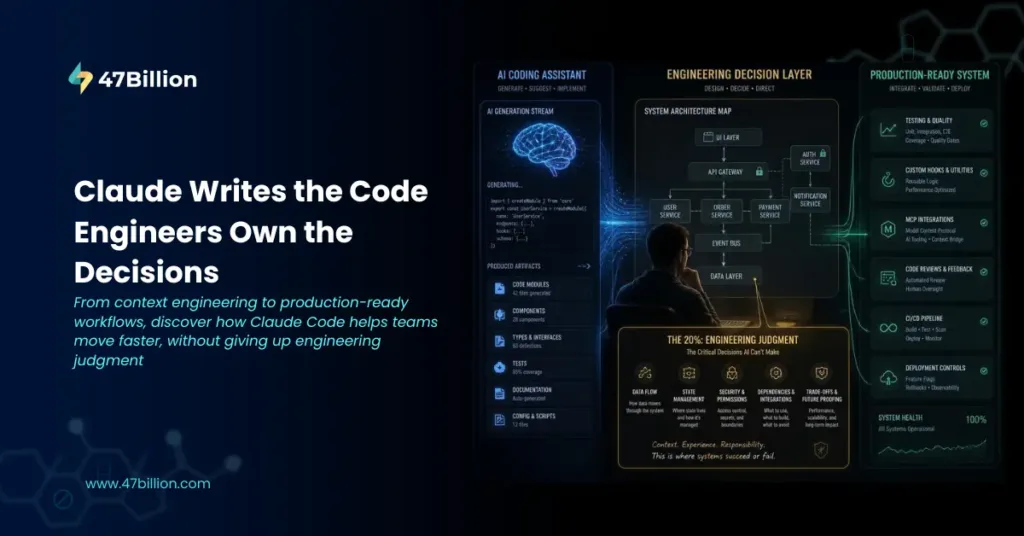
The 80% is real. But here is what nobody tells you: the 20% Claude cannot touch is where the actual product lives. Get that 20% right and Claude’s 80% is magic. Get it wrong and you end up with very clean, very confident, very wrong code.
This is the story of that 20% , told through one feature that nearly broke us.
We Were Building a Presentation Portal. People Told Us We Were Wasting Our Time.
At 7Seers, teachers generate AI-powered lesson content. The natural next step was letting them turn that content into slides, a Presentation Portal built on top of our existing content pipeline.
The scepticism was immediate. “You cannot compete with PowerPoint. You are not Microsoft.” Fair point. But here is what made it feel achievable at first: one prompt to Claude Code and something that looks almost done materialises. Slides rendering. Layouts populating. Content flowing into placeholders. Show it in a demo and people nod.
Then you try to ship it.
Font scaling that worked for a three-word heading collapsed on twelve. Aspect ratios that looked fine on a MacBook Pro broke on the classroom projector the teacher actually uses. And the real problem, the question of what happens when a teacher’s content exceeds a slide boundary — that is not a coding question at all. Does it truncate? Scale the font? Split across slides? That decision requires someone who has watched a teacher fumble with a projector mid-lesson and knows what actually matters in that moment.
Claude cannot hold that context. We had to hold it, make the call, document it, and then give Claude the exact slice it needed to implement.
This is the Pareto Principle in engineering with AI. The first 80% arrives fast. The last 20% is still entirely yours, and in some ways harder now, because Claude raised the floor. The ceiling moved with it.
Every lesson in this post came from trying to close that gap on the Presentation Portal.
The 20% Is Not What You Think
Most engineers expect the hard 20% to be the tricky algorithm or the obscure edge case. It is not. It is the Low-Level Design, decisions that feel obvious once made but require someone to actually make them.
On the Presentation Portal: Claude could build a slide renderer. What it could not do was decide the data model for how slides relate to source content, where state should live when a teacher edits a slide mid-session, or what the component hierarchy should look like so future changes do not cascade into chaos. These are LLD decisions. Claude will make them if you let it, and sometimes it picks something reasonable. But across a complex system, the aggregate of Claude’s autonomous LLD choices is rarely the system you would have designed. It is usually something that works in week one and creates pain in month three.
The trap: Claude’s output looks so polished that you assume the design decisions underneath are equally considered. They are not. The code is clean. The architecture underneath is whatever Claude guessed.
Own the LLD before Claude touches anything. That single rule would have saved us three weeks on the Presentation Portal.
We Kept Dumping Context. That Was the First Mistake.
Our earliest Presentation Portal sessions were expensive and inconsistent, we were giving Claude the entire slide engine every time we worked on a specific rendering sub-problem. Hundreds of lines into a conversation, Claude was making changes that contradicted constraints we had set at the top.
Long context windows do not process uniformly. Claude attends most strongly to the beginning and the most recent turns. Everything in the middle degrades. The fix is not giving Claude more context, it is giving it the right context for the specific task.
Before every session, we now lock down four things: what we are trying to do, what must not change, which specific files are relevant, and what the output should look like. Not the whole feature, this task, this session.
When we stopped giving Claude the entire slide engine and started scoping to the one component under work, with explicit file references and hard constraints, output quality improved immediately. No model change. No prompt rewrite. Just better scoping.
We Built Three Files. They Saved More Time Than Any Prompt.
Claude has no memory between sessions. Every new session starts cold, Claude has to re-discover your codebase by searching around. On the Presentation Portal, two engineers working in separate sessions kept re-litigating the slide overflow decision because neither session knew what had been decided before.
We fixed it with three files.
CLAUDE.md lives at the repo root, your stack, your conventions, the things Claude keeps getting wrong. Keep it short. Every line that does not change Claude’s behaviour is wasted context. A bloated CLAUDE.md is worse than none.
Module-level READMEs are where the real value is. One small file per major directory: what this module does, the key decisions we made and why, what broke and how it got fixed. The moment we wrote the slide overflow decision into the renderer’s README, both sessions picked it up. We stopped repeating ourselves to the model.
rules.md captures decisions you never want Claude to undo, which libraries you chose and why, which approaches were tried and rejected. This stops Claude from proposing the same thing you evaluated and discarded six weeks ago.
Write these just after you finish a change. Two sentences. What changed and why. Two minutes of work. Saves hours across future sessions.
Plan First. We Learned This the Hard Way.
For the first two months on the Presentation Portal, sessions started with “implement X.” They ended with us unwinding Claude’s interpretation of X. Rework compounded.
The fix: before Claude writes a single line of code, ask for a plan. Which files change. What the data flow looks like. What could go wrong. What Claude is choosing not to do and why. Then read it, push back, add the constraints it missed.
We now commit the plan as plan.md before implementation starts. If something goes sideways mid-session, there is an approved spec to diff against. If another engineer picks up the work, they know exactly what was decided. The PR reviewer checks the final diff against it.
The planning prompt is not a step, it is a forcing function. You cannot write a real plan for a feature you have not thought through. The act of planning forces the LLD conversation before a line of code exists.
Then Our Team Grew. Sessions Diverged. We Needed Skills.
Once more engineers touched the Presentation Portal, a new problem appeared: everyone was prompting Claude differently. Commit messages were inconsistent. PRs had no structure. Code review quality depended entirely on who was running the session.
Skills fixed this. A skill is a folder in .claude/skills/<name>/ containing a SKILL.md file. The file has two parts, YAML frontmatter at the top, and the actual instructions in markdown below:
—
name: pr-description
description: Generate a structured PR description. Use when opening a new
pull request or summarising changes for review.
—
## Knowledge
You are generating a PR description for a production codebase.
The PR will be reviewed by engineers who did not write this code.
## Expectations
– Lead with what changed and why, not how
– Note any migrations, breaking changes, or deploy steps explicitly
– Keep it under 300 words
## Limits
Do not summarise individual file changes line by line.
Do not include the full diff.
At startup, Claude scans all available skills and reads only the name and description from each one, roughly 100 tokens per skill. When you give Claude a task, it checks whether any skills match. If one does, it loads the full instructions. If none apply, nothing loads and your context stays clean.
The description field is therefore the trigger, not documentation. Too broad and it fires when it should not. Too narrow and it never fires. The right test: does this description complete “use this when…” with something specific enough that a different skill would not match?
Our baseline, commit formatter, branch naming, PR description, self-review before push, secret scanning, best practices validator, covers most of a senior engineer’s day. Beyond that, diminishing returns set in quickly: each installed skill costs ~100 tokens per session even when not triggered, so keep only what you actually use. Check monthly, delete anything untriggered in thirty days.
One failure we had: a slide generation skill so prescriptive that it kept pulling Claude toward a specific layout structure even when the task needed something different. The skill was winning over the prompt. We split it into two narrower skills, one for content slides, one for title slides, and the problem disappeared. If a skill fights your prompts, narrow it or kill it.
Skills Are Advisory. Hooks Are Not.
Skills tell Claude what to do. Hooks enforce it, they are shell scripts that execute before or after tool calls and Claude cannot override them.
After a few sessions where Claude made changes we did not intend, we added three hooks to the Presentation Portal:
Secret prevention – runs on every file write, scans for API keys and connection strings. If found, exits with code 2, which blocks the action and surfaces the message to Claude so it knows why it was blocked and can reason about it. Catches what the secret-scan skill misses because it fires at the shell level, not the suggestion level.
Test file protection – blocks edits to test files during a fix session. This prevents Claude from making a failing test pass by weakening the assertion instead of fixing the bug. Small but important.
Production deploy gate – intercepts any bash command containing deploy and production, checks for a RELEASE_APPROVAL environment variable, blocks if absent. One hook, no autonomous production deploys.
Configuration in .claude/settings.json:
{
“hooks”: {
“PreToolUse”: [
{
“matcher”: “Bash”,
“hooks”: [{ “type”: “command”, “command”: “${CLAUDE_PROJECT_DIR}/.claude/hooks/check-deploy.sh” }]
}
]
}
}
Exit code semantics: exit 0 allows the action, exit 1 blocks it and shows the error to the user, exit 2 blocks it and surfaces the message to Claude so it can adjust its approach. For the deploy gate, exit 2 is what you want, Claude understands why it was blocked and stops trying.
These live in version control. They apply to every session on the repo, for every engineer. Not optional.
The Presentation Portal Grew. One Engineer Could Not Keep Up. So We Ran Sessions in Parallel.
Three months in, the Presentation Portal had a slide export feature, a teacher preview mode, and a font management system, all in flight simultaneously. One engineer, one session at a time, was too slow.
Parallel sessions using git worktrees: separate checkouts of the same repo, each on its own branch, each running its own Claude Code instance in a separate terminal.
# Terminal 1
claude –worktree feature-slide-export
# Terminal 2
claude –worktree fix-font-scaling
Each session is completely independent, edits in one cannot touch files in another because they are in separate working trees. One engineer steers both, reviews both outputs, merges both PRs. Two to three parallel sessions is the practical ceiling, more than that and review quality drops.
Sub-agents handle a different problem, recurring jobs within a single session. We define them in .claude/agents/:
—
name: verifier
description: Runs the app and checks that changes work before reporting done.
tools: Bash, Read
—
Start the app with `make run`. Exercise the changed behaviour and the two
nearest adjacent flows. Report what you saw. Do not fix anything, report only.
The verifier runs a fresh context window at the end of a session to check the work. Because it did not participate in building the code, it is not anchored to the same assumptions. It catches things the main session missed, especially on the Presentation Portal where a change to the slide renderer could silently break the export path.
Rule of thumb: different files, independent work → parallel sessions. Recurring job within a single task → sub-agent.
We Connected Claude to Our Actual Systems via MCP.
Debugging the Presentation Portal meant bouncing between Claude, our database, and our GitHub issues. Every tool call was manual, Claude would write a query, we would run it, paste the result back. Half a session’s time went to that loop.
MCP (Model Context Protocol) fixed it. It is how you extend Claude Code beyond files and bash, connecting it to real systems so Claude can query your database, pull GitHub issues, or check deployment status directly within the session.
{
“mcpServers”: {
“github”: {
“command”: “npx”,
“args”: [“-y”, “@modelcontextprotocol/server-github”],
“env”: { “GITHUB_TOKEN”: “<your-token>” }
}
}
}
Once connected, Claude calls those tools natively. The difference between “Claude writing a query for you to run and paste back” and “Claude running the query, seeing the result, and continuing” is larger than it sounds. On the Presentation Portal, connecting Claude to our GitHub MCP server during debugging sessions eliminated most of the copy-paste overhead.
The Claude MCP marketplace already has connectors for GitHub, Jira, Notion, Linear, and Postgres. Check there before building your own.
The Codebase Grew. Claude Started Navigating Blind.
Six months in, the Presentation Portal’s slide engine had real history, decisions, dead ends, refactors. Claude’s default behaviour on a large codebase is to search free-hand, pulling in more context than the task needs. Token budgets went fast. Output started missing constraints specified earlier in the session.
Two things helped.
First, explicit file scope in every prompt. Not “fix the font scaling bug.” But: “fix the bug in src/presentation/renderer/font.py at line 142. Do not touch anything else. The scaling factor is not being applied to nested text nodes.”
Second, we tried Graft, an open-source code graph tool that builds a dependency map of the codebase so Claude gets structured context for a specific module instead of searching free-hand. The numbers from their benchmarks: 46% fewer tool calls, 42% fewer tokens, 60% faster task completion, and a measurable correctness improvement on SWE-bench Verified.
graft init hooks into Claude Code sessions and registers six MCP tools Claude can call natively. The one we use most is graft_blast, blast radius analysis. Before committing any change to a shared utility, Claude runs graft_blast on the file it just touched, sees what depends on it, and flags anything downstream that might break. We were missing that entirely before. graft viz also renders an interactive dependency graph in the browser, useful for onboarding sessions where you want to show Claude how the system fits together before touching anything.
First build on a new codebase is slow, it runs LLM summaries on every file. After that, content-hash caching means subsequent builds only reprocess changed files. Whether the upfront cost is worth it depends on how often you are watching Claude navigate the wrong files.
`/compact` Is Not a Last Resort.
Long Presentation Portal sessions – the ones where we were working through the entire font management system, would degrade mid-session. Claude started missing earlier constraints, repeating things, producing slightly off outputs. The signal was subtle but consistent.
/compact compresses session context: Claude summarises the conversation history and replaces it with that summary, freeing up context window. It does not erase anything, it distills it. The session continues with Claude’s understanding of what happened, not a blank slate.
The mistake is using it as a last resort when Claude warns you the window is almost full. By that point the session quality has already degraded. Use /compact after each discrete chunk of work, finish a feature, compact, fix a bug, compact. Start the next thing fresh.
Auto-compact will trigger on its own around 80-85% context usage depending on your version and model, but that is too late for consistent output quality. Manual compaction after each task is the right cadence. One warning: the summary Claude generates is not perfect, constraints stated casually mid-conversation sometimes get compressed out. If something is genuinely important, it belongs in CLAUDE.md or the module README, not just in the conversation history.
Pick the Right Model. We Were Using Fable 5.1 for Tasks That Needed Haiku.
Not a confession we are proud of. Early on we defaulted to the most capable model for everything because it felt safer. It was not, bigger models are slower, and for simple one-file tasks the extra latency is the only thing you notice.
Current lineup as of mid-2026:
| Task | Model |
| Quick lookups, simple one-file changes | Haiku 4.5 |
| Most daily dev work — bugs, features, implementation | Sonnet 5 |
| Architectural reasoning, complex multi-step work | Opus 5 |
| Long-running agents, maximum correctness required | Fable 5.1 |
Most of the Presentation Portal work runs on Sonnet 5. Opus 5 comes in when we are doing real architectural work, planning a complex feature, working through a data model decision. Fable 5.1 is for when we genuinely cannot afford a wrong answer. Specify the default in your CLAUDE.md so it is not an ad hoc decision every session.
Build a Feedback Loop. Claude Working Blind Produces Worse Output.
The Presentation Portal has visual output. Early sessions had Claude generating slide layouts without any way to see the result. We would run it, screenshot it, describe what was wrong, Claude would guess at the fix. Three cycles per change, minimum.
The fix: give Claude a screenshot tool via MCP so it can see what it built. The cycle of implement → screenshot → compare to mock → adjust is dramatically faster than the manual describe-and-guess loop.
For non-visual work, the minimum is making sure Claude can run your tests from within the session. One command, exits non-zero on failure, documented in CLAUDE.md under ## Commands. Tell Claude at the start of every session: “Run the tests after every change. Do not report done until they pass.”
For bug fixes specifically: write the failing test first. Ask Claude to reproduce the bug as a test, confirm it fails for the right reason, commit it. Then ask Claude to make it pass without touching the test file, the hook enforces this. A pre-existing test that Claude could not rewrite is proof the bug is actually gone.
This feedback loop is what makes parallel sessions and sub-agents safe. When Claude can verify its own work, you can run multiple sessions simultaneously and review outputs instead of supervising each step.
We Stopped Reviewing PRs Properly. That Was Expensive.
There was a period where we accepted Claude’s output because it looked right. Tests passing, lint clean, code readable. Then we started finding things in production that should have been caught in review.
Claude is good at local correctness, code that is consistent with the files it touched. It is not good at global correctness, whether the implementation fits the rest of the system or makes the right tradeoff between two technically valid approaches.
On the Presentation Portal, Claude implemented a slide caching approach that was technically correct but conflicted with how we had structured state in the rest of the teacher portal. It worked. It became a maintenance problem two sprints later.
PR review for AI-generated code needs to cover three things a linter cannot catch: does this actually solve the stated problem; what happens in the cases Claude did not test for; and does this fit how the rest of the codebase is structured. The third is the one most teams skip because the code looks fine in isolation.
Read the diff like you wrote it. That is the bar.
Lock Down Permissions Before You Regret It.
If you are running Claude Code across a team, configure permissions intentionally. The defaults are permissive, Claude can read and write files anywhere in the project, run arbitrary bash commands, fetch from the web.
In .claude/settings.json:
{
“permissions”: {
“allow”: [“Bash(make build)”, “Bash(make test)”, “Bash(make lint)”, “Bash(git *)”],
“deny”: [“Read(.env*)”, “Read(./secrets/**)”, “WebFetch”, “Bash(curl *)”, “Bash(wget *)”]
}
}
The deny list keeps credentials out of Claude’s context and blocks arbitrary network calls. The allow list pre-approves the safe inner loop so engineers are not constantly approving routine commands.
For production-critical codebases: disableBypassPermissionsMode prevents Claude from asking to override restrictions. allowManagedPermissionRulesOnly means project-level settings cannot loosen what the platform team has locked down at the org level. These settings live in version control and apply to every session on the repo.
The Presentation Portal Shipped.
Teachers are using it. PowerPoint is still around.
We got there not by trusting the first impressive demo, but by learning, session by session, mistake by mistake, exactly where Claude’s 80% ends and the engineer’s 20% begins.
The 20% is the LLD you have to own before Claude sees the ticket. The plan you have to write and commit before implementation starts. The context files you have to maintain so sessions do not repeat old arguments. The hooks that enforce what skills cannot. The PR review that catches what tests miss.
None of this is glamorous. None of it shows up in a benchmark. But it is the work that determines whether the 80% Claude writes is correct or just convincing.
At 47Billion, we build production AI systems and help engineering teams do the same, without ending up in a codebase they cannot maintain six months later. If you are navigating the gap between “Claude makes impressive demos” and “Claude ships reliable product,” we have been through it.
hello@47billion.com | [47billion.com/contact-us/](https://47billion.com/contact-us/)