Our developers use AI coding assistants like Claude and Codex inside their IDEs, and features now arrive faster than anyone can re-verify the older ones. We approached it as an AI regression testing problem. A regression cycle that still takes a good part of a working day of QA time was the thing to shrink, and we hoped to cut it by more than half. It took three attempts to get there, and several problems are still unsolved.
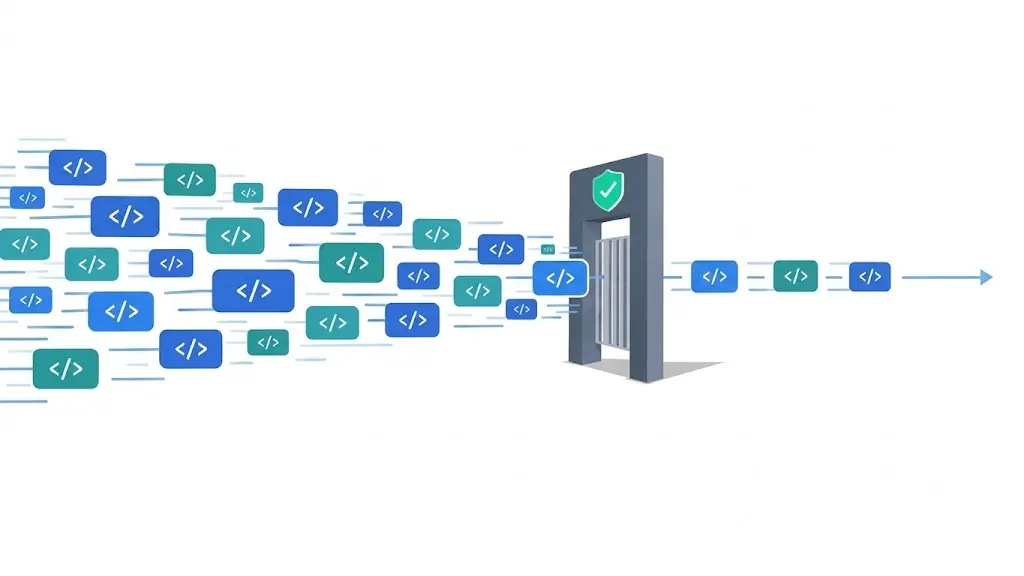
The first idea came from inside the organization: let the same AI tools write the test cases, the way they write code. Two problems showed up right away. An AI assistant inside an IDE does not know which use cases matter or what correct behavior looks like on a given screen, so the tests it writes are generic. And it has no reliable way to point at an element on the page. Testers have always used Chrome extensions to grab selectors by ID, class, or role, and modern sites are built on many frameworks, some structured to resist inspection the same way sites defend against scraping.
Before building anything, we looked at what the market offers. Managed services such as QA Wolf pair AI agents with dedicated QA engineers who build and maintain the suite in standard Playwright or Appium code, so the tests stay with the customer, but coverage decisions and maintenance run through an outside team. Low-code platforms such as Testim and Mabl let testers author tests through a visual interface and use machine learning to repair tests when the UI changes. Open source options such as Playwright’s code generation were not production ready in our experience and needed a lot of hand holding from the developer or tester. Some of the commercial tools we looked at were priced at around 600 dollars a month or more, and data privacy and security concerns can come up when a black box tool handles your application data. We wanted a lightweight tool that we control, with tests that live in our own repository and inputs we choose. 47Billion builds AI agents and end to end products, and this is tooling we could build ourselves.
Three Attempts Before It Worked
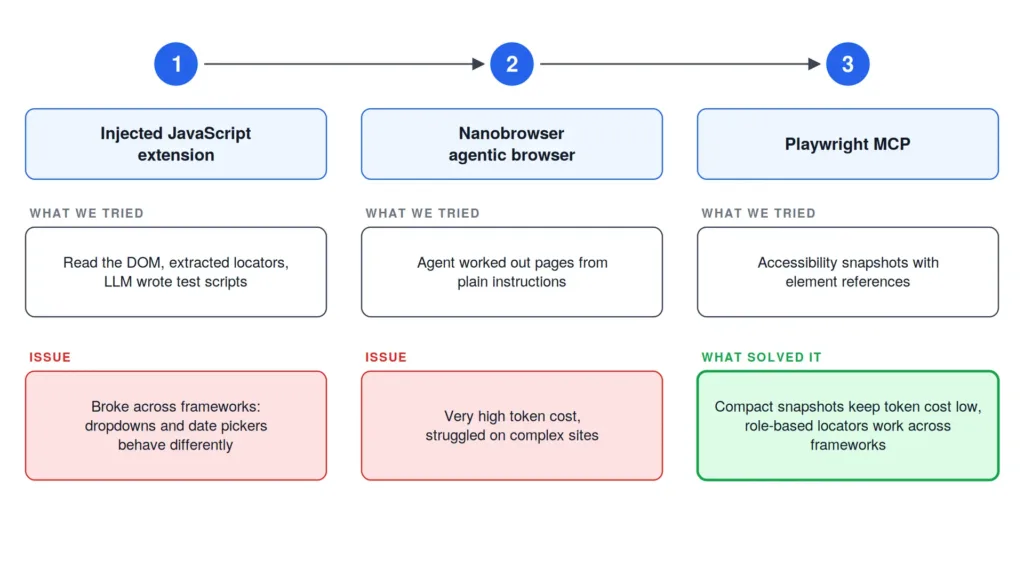
After talking to our QA engineers, we built a browser extension that injected a fixed block of JavaScript into the page, read the DOM, and extracted locators. Those locators went to an LLM, which generated test scripts, and we produced a report at the end. When the logic could not resolve a locator, it drew a bounding box around that element on the page, so a person could see where it broke instead of reading a stack trace. On straightforward sites it worked.
Then we tested across frameworks and the locator problem came back in a new form. A Bootstrap site behaves differently from a custom one. A dropdown works one way here and another way there, and a date picker has its own interaction model. One fixed block of logic could not cover all of that, because the interaction kept changing along with the markup.
Around then we started exploring agentic browsers and tried Nanobrowser, an open source Chrome extension that runs Planner, Navigator, and Validator agents inside the browser. We gave it plain instructions and let the agent work out the page. Token consumption was very high, so the cost was too, and it struggled on complex websites. We could not run it across regression cycles, though it did confirm that agentic reasoning was the right direction.
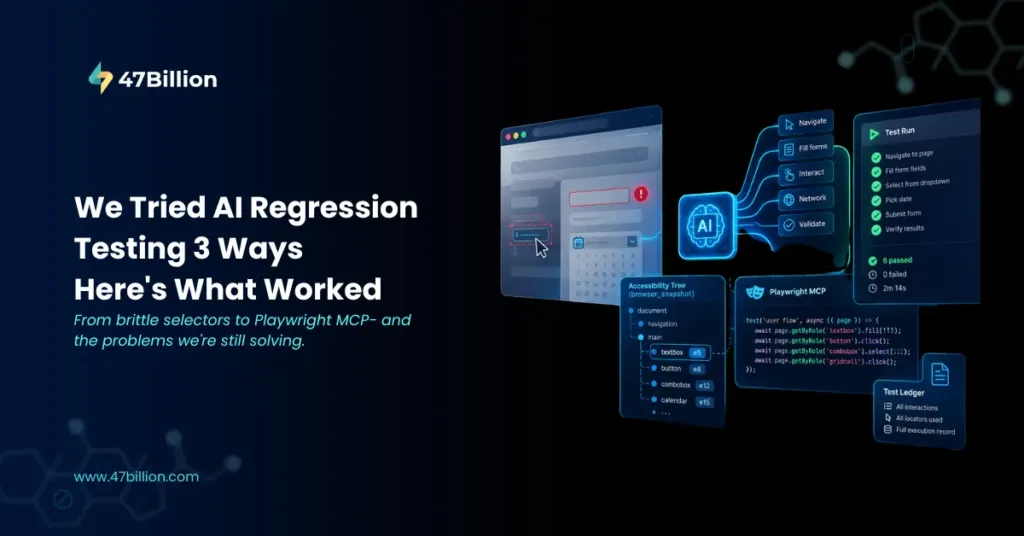
What worked was Playwright MCP, a Model Context Protocol server from Microsoft that lets an LLM drive a real browser through Playwright. The Model Context Protocol is an open standard that Anthropic introduced in November 2024 for connecting AI applications to external tools. Playwright MCP exposes more than 40 tools once its optional capabilities are enabled, covering navigation, forms, network, storage, and tracing. The one that changed things for us is browser_snapshot. A snapshot is a structured tree of the page built from the accessibility tree, the same structure screen readers use, and every interactive element carries a reference ID such as e5. That makes it different from a screenshot. According to Playwright’s documentation, a snapshot costs roughly 200 to 400 tokens, against thousands for a raw DOM dump or a screenshot, which is why handing the agent snapshots instead of the DOM kept us inside the context limit and the budget. The references hold only until the page changes, so the agent takes a fresh snapshot after each navigation.
Because the agent reads roles and names, it tends to write locators such as getByRole instead of brittle CSS or XPath selectors, and those survive routine restyling better. Playwright’s own tooling has moved the same way. Since version 1.56 it ships three test agents: a planner that explores the app and writes a Markdown test plan, a generator that turns the plan into test files, and a healer that repairs failing tests. Playwright also offers a command line interface for coding agents, while MCP remains better suited to exploration and long running loops that need a persistent browser.
How the System Works Today?
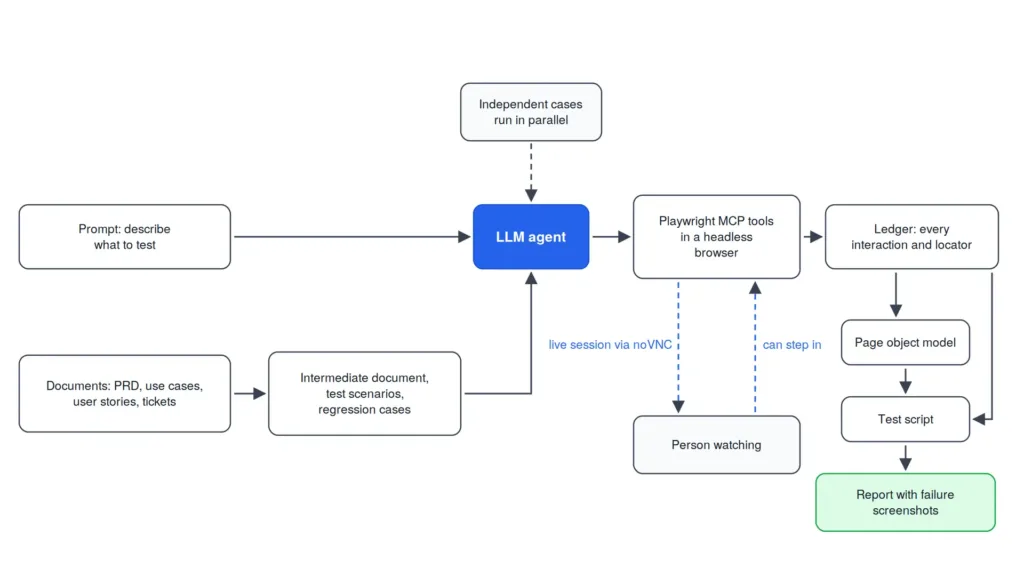
The system takes two kinds of input. With a prompt, you describe what you want tested, and an LLM drives Playwright MCP tools to navigate the site, fill forms, and interact with elements in a headless browser on the backend. At the end of the run we have a full record of the journey, which we call a ledger, containing every interaction and every locator used. With documents, you upload a PRD, use cases, user stories, or tickets, either pulled from a work tracking system in structured form or passed in as a document that our system parses and chunks. From these we build an intermediate document that classifies every use case, so the agent knows what to navigate and what to verify. It then generates test scenarios, and each scenario carries its own regression cases: required field checks, whether a text field accepts numbers, and so on, categorized as happy paths, edge cases, and the rest.
Independent test cases run in parallel. The headless session streams live to the interface through noVNC with no visible latency, so a person can watch the test happen. noVNC is an HTML5 VNC client that runs in the browser, and because it also takes input, a person can step in when a test fails and needs a human. Once navigation completes, the ledger becomes a test script in the framework you choose, structured the standard way: a page object model that holds the methods and variables, and a test script that uses them. A page object model is a design pattern that puts the selectors and actions for a page into a dedicated class, so tests call methods instead of raw locators. When the UI changes, the edit lands mostly in the page object model instead of being scattered across every test. You also get a detailed report with failure screenshots. The script is plain, deterministic code that runs the same way every time, so it works in tomorrow’s regression cycle without anyone redoing the exploration.
What Is Still Unsolved
Running this on real applications raised the next problem quickly. When a regression test fails, is the product broken, or did the UI change? The system cannot answer that reliably yet. Playwright MCP already exposes a page’s network requests, so we are adding network tracking alongside element interaction, which lets a failure be traced to the UI or to the backend and is also why API testing is on our roadmap.
Self-healing covers the other half, and it comes in three technical families. DOM and attribute based healing finds the element a test most likely meant when its selector fails. Healenium, an open source library originally from EPAM, catches Selenium’s NoSuchElementException and compares the current DOM tree with a stored earlier one, healing only when the match score clears a configurable threshold. Testim scores attributes such as text, position, class, id, and structure with a machine learning model and picks the highest confidence match, with a visual fallback. Visual approaches, such as Applitools Eyes, compare screenshots against an approved baseline and catch drift the DOM layer misses. Accessibility tree healing identifies an element by its role, which is how Playwright’s healer agent works. That healer is documented to finish with either a passing test or a skipped one when it believes the functionality is broken, so it can flag a real bug instead of patching around it.
All three families can still hide a real bug. If a button that submitted a form now does something else, a naive healer fixes the locator and the test passes. We plan to lock assertions so a behavior change cannot be absorbed by a locator fix, score confidence on every proposed heal, log each one for review, and treat a high heal rate as a warning. In a page object model, assertions conventionally live in the tests and not in the page objects, which keeps a locator repair separate from an assertion change. We have not shipped any of this yet.
Locators were the other recurring cost, and for projects where we generate the frontend ourselves we can remove it. Our internal AI development platform can be given rules to attach stable identifiers to elements and record them in a locator file that travels with the code, so there is nothing to discover. Vendor built or externally controlled frontends still need locator discovery the way we do it today, and when code goes to a client, the identifiers can be renamed or kept in an attribute that is not visible, so they do not have to be stripped.
We also wanted the agent to learn how screens connect to each other, and that is where model quality started to matter. Claude Sonnet and Opus handled workflow discovery well, Haiku up to a point, and the Gemini models we use gemini-2 lite series failed more often. Token cost also climbs with every step. Open ended exploration also runs into edge cases quickly. On a jobs page with infinite scroll, the agent keeps scrolling because it senses something new might appear, even when the content repeats. The same happens on enterprise portals with an unusual UI, such as a rule-based one we tested: where the UI structure is well known the agent does a good job, and where it is not, it gets lost. We handle this with a human in the loop, so after a set number of iterations, say thirty or forty, the agent stops and asks. We also link use cases to specific screens and URLs in the intermediate document, and use vision models on screenshots to produce screen definitions, which keeps exploration targeted. One idea we are considering is writing discovery out as a screen definition file in Markdown that a person can read, correct, and feed back in, so discovery is reviewable instead of hidden inside the agent.
A headless browser makes some things harder. Playwright MCP already has tools to handle JavaScript dialogs and to upload files, but camera and microphone permission prompts are a different case. Chrome has launch flags for them: –use-fake-ui-for-media-stream accepts the permission prompt automatically, –use-fake-device-for-media-stream supplies a fake camera and microphone, and –use-file-for-fake-audio-capture feeds a WAV file in as microphone input. Playwright can also grant permissions per browser context. Since Playwright runs real Chrome instances, the dialog never has to appear, but a person cannot step in on a dialog that is never rendered, and some video conferencing tools do not work in headless mode. We are checking whether noVNC can capture those interactions.
Voice features are a bigger gap. A speech to text feature can be tested by feeding a recorded WAV file in as the microphone input with –use-file-for-fake-audio-capture. A text to speech feature produces audio, so it needs an evaluation step that a browser assertion cannot provide, and LLM outputs need a different kind of evaluation framework than browser testing. We are looking at dedicated evaluation tooling for LLM inputs and outputs, paired with a speech provider to generate and transcribe audio. The system is a single agent today, so the plan is to add expert agents, with one handling browser context and another handling speech.
The last question is where regression testing sits next to loop engineering, in which agents write code and tests and iterate until the tests pass. As generated code gets closer to correct, it is fair to ask whether a separate regression tool still earns its place. Our loop works from a single plan. One agent writes test cases from that plan, another builds the backend, and the tests run against the generated code until it passes. That covers the backend and does not yet cover end to end behavior through the frontend. AI review also still misses things a person catches by looking at the result. In one of our own runs on an industry portal, a rename from one term to another was applied in some places and forgotten in others, and it took human supervision to notice. That suggests a different role for the system: instead of only a regression tool, it can be the end to end verification step inside the loop, invoked through MCP, so frontend and backend changes are tested together as part of the build.
Our view is that this kind of tooling stays useful for now. Language models do the fast and smart work well, but the systems around them still depend on people who can see what is happening, review it, and step in. Automated reviews, including the lightweight ones coding assistants run on their own, work in most cases and fail most often when something has to be judged visually. That could change within six months to two years, and we expect to revisit this view when it does.
The single agent is the main constraint on what comes next. Every tool call adds to its memory, so token consumption grows with the length of a run. We plan to split the work across specialist agents, each carrying only the context it needs, so no single agent has to hold the whole run. We are also adding chained test cases, where the output of one test becomes the input of another, and better code reusability so generated scripts follow the conventions a QA team wants to maintain. File upload through the UI already works for us. What is left is deciding which file goes into which field, managing those files as test data, passing a file from one chained test to the next, and verifying the result after the upload. Flaky tests stay a human problem, because healing a badly designed test gives you a badly designed test that fails less often.
For mobile, Google recently open sourced Artemis, a project that lets an AI agent in an IDE drive a real Android device or emulator through MCP using natural language. It supports Android only for now, with iOS on its roadmap, and we want to try it on our mobile app. We are also setting up a separate session on bringing the system into 47Billion’s internal AI development platform, as a browser extension and as an MCP invoked tool, so end to end testing happens during generation.
At 47Billion, we build AI-first product engineering systems, from LLM pipelines and agent infrastructure to internal tooling that makes development teams faster without sacrificing quality. If you are thinking through where AI fits into your QA workflow, we are happy to think through it with you.
Contact: hello@47billion.com