- Intelligence is becoming a commodity, and taste is personal. One fixed design prompt inside our product could never match every teacher’s idea of a good presentation, so we stopped trying to keep the brain inside the product.
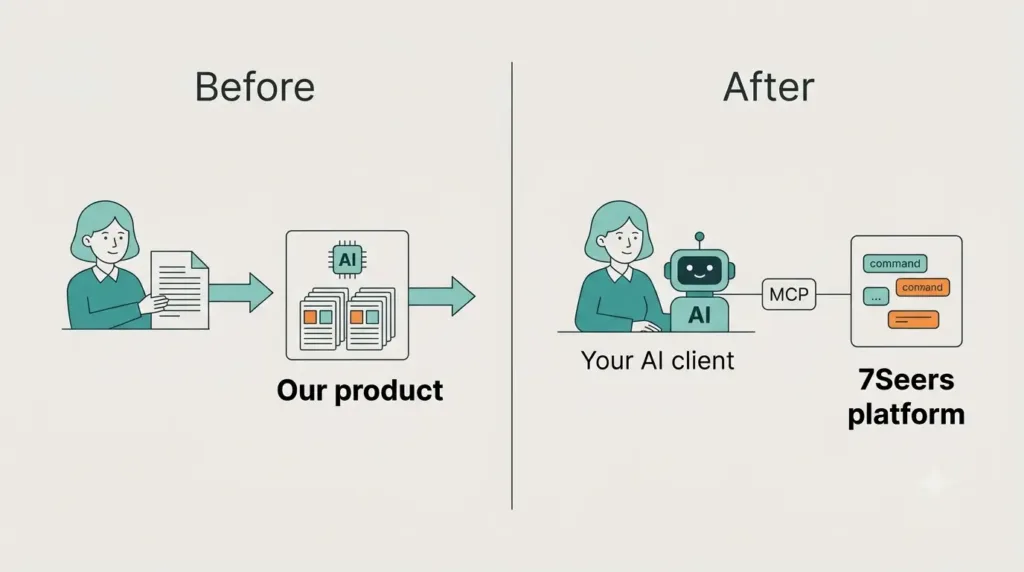
- Instead of putting AI inside the portal, we made the portal something an AI client can operate, through the Model Context Protocol (MCP).
- Step one is a command based architecture: a small vocabulary of typed, atomic commands. The AI client reasons, and the server validates, applies and returns structured feedback. This also gives every client a quality floor, including a fix for the overlapping elements that no amount of prompting solved.
- Step two is MCP, which makes that capability reachable by any compliant AI client. Authentication was the hardest part, and the answer is standards-based OAuth on top of the existing identity layer. The user approves access in the browser, so no password ever reaches the AI client.
- MCP is an open protocol, so the interface itself is not the moat. Defensibility comes from trusted execution, domain grammar baked into the tools, the system of record and distribution.
1. Interfacing your components to AI: why there is a need
At 47Billion, an AI-driven product engineering company, we build 7Seers, an AI-powered Employability platform for Tier 2 and Tier 3 engineering and management colleges in India. One of its components is the presentation portal, where teachers create lecture decks, course material and training content.
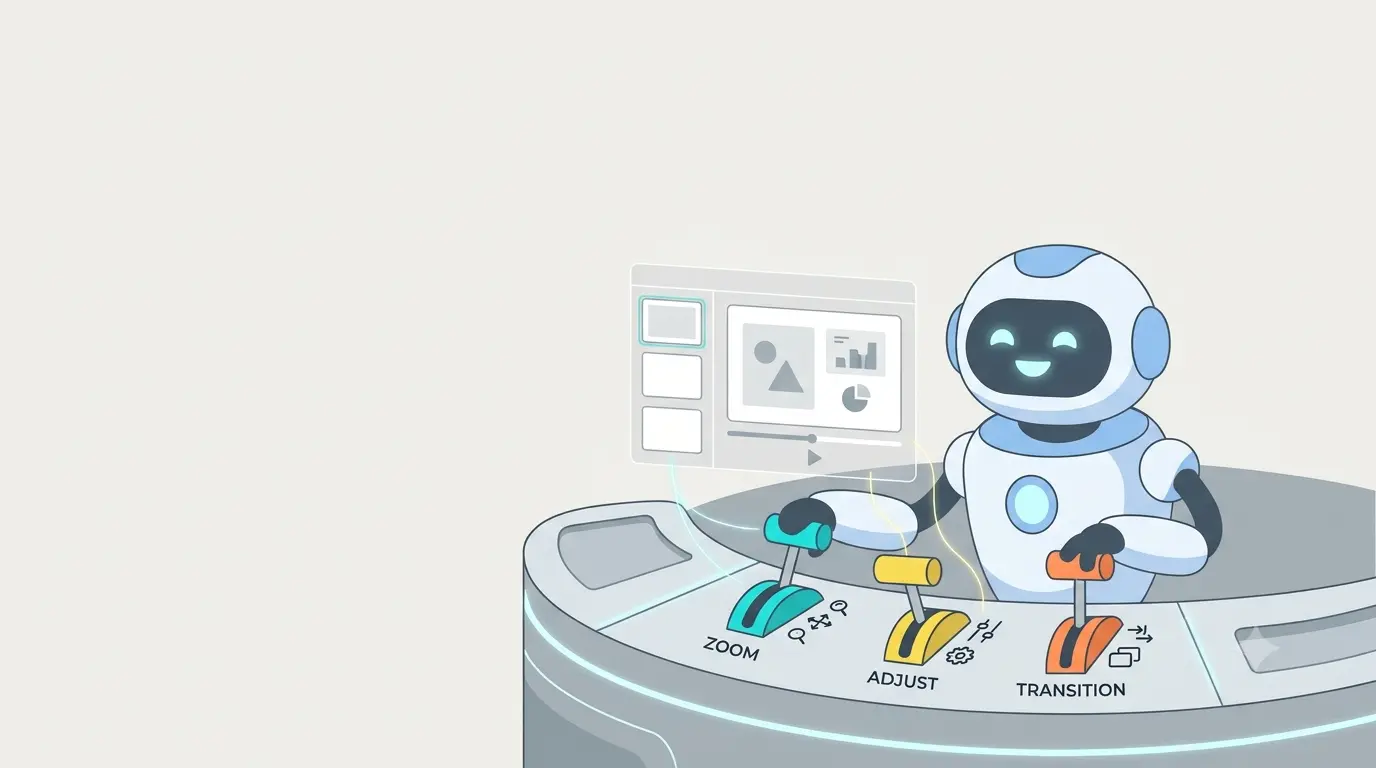
Our first version of AI in this portal followed the obvious pattern. A composer screen took a teacher’s request, passed it to an LLM together with a fixed design prompt and a fixed set of layouts, and rendered the result as slides. It worked, and it taught us four things.
Problem 1: no matter how well we tuned the prompt, the output repeated itself
We had a basic set of prompts and a basic set of layouts, and the model picked the most relevant layout for each request. However much we tweaked the prompts, the model gravitated to the same few choices. Decks started to look alike, and the same layout kept coming back.
Problem 2: taste is personal
Every teacher has their own idea of what a good presentation looks like. Some want dense reference slides, some want one idea per slide, and some have institutional colours and templates. A serious lecture in the style of a university course, a playful deck for school children and a persuasive sales deck are all legitimate requests, and a single design prompt encodes only one point of view.
If we kept adding templates and themes to cover the gap, we would end up rebuilding the old PowerPoint model: a large library of fixed designs that users pick from. We were forcing a fixed structure onto the LLM when there was no need to.
Problem 3: the whole-deck JSON was heavy
Technically, the original portal was state-based. The deck was one large JSON document. To generate a presentation, the model produced that JSON and we streamed it slide by slide to the user. To change one text box in a ten-slide deck, we sent the data of all ten slides to the model, the model updated the one part it needed to and sent everything back, and the front end re-applied it. That is a very heavy round trip for a small edit.
It also got heavier as the content got richer, since every change meant saving the whole document again.
Problem 4: the model could not reliably lay things out
The model could not reliably lay out elements on the slide without overlap. No amount of prompting fixed it, and we come back to how we solved it in section 2.6.
The strategic shift
Problems 1 and 2 have the same root. We were trying to keep the intelligence and the taste inside our product. The alternative is to separate two concerns:
- Intelligence and taste live in the AI client the user already chooses.
- Capability, correctness and access live in our platform.
There is a second reason this shift matters. For a period, building a thin layer on top of an LLM was a viable product. General AI assistants keep adding design tools, canvases, document editors and motion tools of their own. A product that only wraps a model competes with the model itself, while a product that offers a real capability in a form any assistant can operate sits in a different position.
Not long ago, if you wanted your system to be used by people who work with AI, the advice was to build an MCP server or list your product in a marketplace where the major assistants can connect to it. MCP, the Model Context Protocol, is an open standard that lets an AI client discover and call a product’s tools. The benefit is ease of use: users do not move to a new tool, the tool comes to them.
We moved from “AI inside our product” to “our product as a capability that AI can operate”. Differentiation then comes from the quality of the capabilities we expose, the guardrails we enforce and the trust we build, and the engineering question becomes how to make our components safely operable by a model we do not control.
Where the AI comes from
Our users are teachers at Tier 2 and Tier 3 colleges, and not all of them will have an AI client. So we think of the command layer as a contract with two kinds of clients. The first is an external AI client that the teacher or institution already uses, which is where we started. The second is an agent inside the portal that uses the same commands, for teachers who bring no AI of their own. Because the commands are the contract, the platform can serve both without a rewrite.
Two decisions
What we wanted was an interface designed for a model as its primary user: small typed operations, readable state, structured feedback and a standard way to authenticate. Those needs lead to two decisions, and the rest of this post follows them in order:
- Small, typed, safe operations with feedback led to a command based architecture (section 2).
- A standard way for any AI to find, call and authenticate to those operations led to MCP (section 3).
2. Command based architecture
2.1 Teaching an LLM your UI
An LLM can only produce a good component if it knows the grammar of that component. There are two ways to get there. You can rely on a grammar the model already knows, such as HTML or JSON, or you can infuse a custom grammar through prompts, tool schemas, instructions and examples.
We compared the options against the same criteria: how familiar the format is to the model, token cost, streaming friendliness, validation, ease of making small edits later, security and portability across models and clients.
A. Raw HTML, CSS or JSX. Models know it extremely well, but it is hard to validate, hard to edit one element without regenerating the page, and executable in a browser, so it carries a security surface.
B. Custom tags or XML-like markup. Easy to read and to stream, but it needs a parser and a specification that the model must be taught in every session.
C. JSON component trees. This is the most common approach in generative UI libraries. Models are very fluent in JSON, and schemas can constrain the shape. The main cost is verbosity: braces, quotes and repeated keys add up to a higher token bill.
D. A custom DSL. The clearest example is OpenUI, built by Thesys: a compact, streaming-first language where each line defines one component. Reported token savings over JSON range from about 7 percent to 67 percent depending on who measures and on which fixtures (repository, independent recount, benchmark article), so we treat it as compact and streaming-friendly without relying on one headline number.
A custom DSL sits outside the model’s training distribution, so the prompt must teach it and keep it in sync with the components.
E. Commands over MCP (our approach). The model emits typed commands that carry JSON elements. The server validates and applies them. The grammar is taught through tool schemas, an instructions file and a templates resource.
As we understand it, a heavier route some assistants use for PowerPoint is a sandboxed virtual machine that writes JavaScript and emits a .pptx file. That produces a file, but not a live, editable deck inside the product.
| Option | Familiar to model | Token cost | Streaming | Validation | Small edits | Security surface |
| A. HTML / JSX | Very high | High | Possible | Weak | Hard | Large |
| B. Custom tags | Medium | Medium | Good | Needs a parser | Medium | Small |
| C. JSON trees | Very high | Higher | Possible | Strong with schemas | Medium | Small |
| D. Custom DSL (OpenUI Lang) | Low, taught in prompt | Lower (per project) | Designed for it | Strong, library driven | Medium | Small |
| E. Commands over MCP | High (JSON, tool calls) | Higher today | Per slide | Strong, server side | Native | Small |
Why we chose E
First, the model already knows the format. Tool calls and JSON objects are the most familiar surface an LLM has, so we spend our prompt budget on teaching design rules, not syntax.
Second, a teacher revises a presentation after it is generated. Commands such as updating or deleting a single element make a small change cheap and local, which a regenerate-everything format cannot do.
Third, validation belongs on the server. A server that measures text, checks bounds and contrast, and returns structured warnings gives the model a feedback loop. A format that is only ever parsed and rendered gives it none.
OpenUI and MCP are complementary
OpenUI Lang and MCP commands are complementary, not competing. OpenUI Lang focuses on how a model renders an interface for a human, typically inside a chat response, while MCP commands focus on how a model operates and edits a stateful component that lives in the platform. A compact format could even sit inside the command payload to reduce tokens on large decks.
2.2 Command based versus other architectures
It helps to compare four common models of how an application changes state.
- CRUD over REST. The client creates, reads, updates and deletes resources. Each endpoint maps to a resource and the server mostly stores what it is given. This is simple and works well when a human-designed UI knows exactly which endpoint to call.
- State-based or snapshot saving. The client holds the whole state, edits it locally and sends the whole thing back. Every save overwrites everything. Small edits carry a large payload, and the server cannot tell what changed or why. This is what our first version did.
- Document-based editing. The application treats the content as one document, often a large JSON structure, and edits are patches or replacements of that document. The unit of change is a document diff, not an intention.
- Event sourcing. The system stores a log of events that describe what happened and derives state from the log. This is closely related to commands. The usual distinction is that a command is a request (“add this element”) which can be rejected, while an event is a fact (“element added”) which has already been accepted.
A command based architecture centres on the request. Every change to the presentation is expressed as a small, named, typed operation with parameters. The system validates the command, applies it atomically and returns the result. State is the outcome of applying commands, not something the client uploads.
Our vocabulary is deliberately small: a handful of commands to add, replace, patch and delete slides, and to add, update and delete the elements on a slide.
Two properties matter most for AI clients. Commands are deterministic: the backend does no AI interpretation, so the same command on the same state gives the same result. And they are atomic: a command either applies or it does not.
2.3 Inside the editor: the command pattern
You can think of the command layer as a low level design decision inside the front end. Every operation the editor supports is expressed as a command that follows one common interface. Adding a slide is a command. Appending a slide is a command. Creating a shape is a command. Changing a colour or an opacity is a command. This is the same vocabulary an AI client uses, as section 2.4 shows. The commands that drive the editor in the browser are the ones sent through MCP.
A simplified sketch (illustrative, not our exact code):
interface Command {
execute(editor: Editor): void; // what this command does
undo(editor: Editor): void; // how to reverse it
}
class Editor {
private history: Command[] = [];
run(cmd: Command) {
cmd.execute(this);
this.history.push(cmd); // remember what happened
}
undo() {
this.history.pop()?.undo(this);
}
}
Every command goes through one common class, the editor, which applies it and records what changed on a stack. That stack is what powers undo and redo. Before this, supporting undo meant keeping copies of large state. Now it means remembering small operations.
This design also replaced a fragile piece of the old system, where page elements were linked together by hand-written parsing logic. With commands, the unit of change is the operation itself, which makes replacing or logging one particular change straightforward.
2.4 How elements are created, updated and deleted
A slide added by a teacher’s click and a slide added by an AI client go through the same command, so they get the same validation, the same undo and the same live stream.
Every slide is a list of elements, and each element is a small JSON object with a type, a position and its content. Here is a simplified command that adds a title to a slide (illustrative, not our exact schema):
{
“command”: “place_item”,
“params”: {
“slide”: 2,
“item”: { “type”: “title”, “content”: “Why command based architecture suits AI” }
}
}
The model leaves several things to the server. Sizing and measurement are resolved by the platform, styling comes from the chosen theme and not from raw values the model invents, and each call is saved when it finishes.
Changing one element later is a single targeted command:
{
“command”: “edit_item”,
“params”: {
“slide”: 2,
“item”: “i-1”,
“updates”: { “content”: “Why commands suit AI clients” }
}
}
And removing it is just as small:
{
“command”: “remove_item”,
“params”: { “slide”: 2, “item”: “i-1” }
}
Compare this with the other models. In a snapshot approach, changing one title means the client sends the whole deck back. In a REST approach, it may mean several calls across slide and element endpoints. In a document approach, it means computing a patch against a large structure. In the command model, the intention and the payload are the same size.
This addresses the round trip described in problem 3 of section 1. To change one part of a deck, the model no longer has to send the entire presentation back. It sends a command that says, in this slide, change this element. Reading the current state is still a whole-deck call, which adds to the token cost described in section 2.10.
2.5 The editing workflow and the feedback loop
For an AI client, an editing session follows a predictable loop:
- Choose a theme. For a new deck, the client lists the available themes and the user picks one. If the user has no preference, the client picks the closest match and says why in one line. The server will not start a new deck without a valid theme.
- Create a session. The client gets a session and a live link. The link is shared with the user immediately, so they can watch the deck build in real time.
- Read state when editing something that exists. A state call returns the full presentation, so the model sees what is there before it changes anything.
- Apply commands, slide by slide. Each call persists when it finishes, so a finished slide is never lost if something interrupts the run, and the user sees elements appear as they are created.
- Read the warnings. After the commands are applied, the response carries a structured report for each touched slide.
- Fix and resend, within a retry limit. If problems remain after the limit, the client stops and tells the user what is left, rather than looping.
- Verify by reading state again, then save to a course.
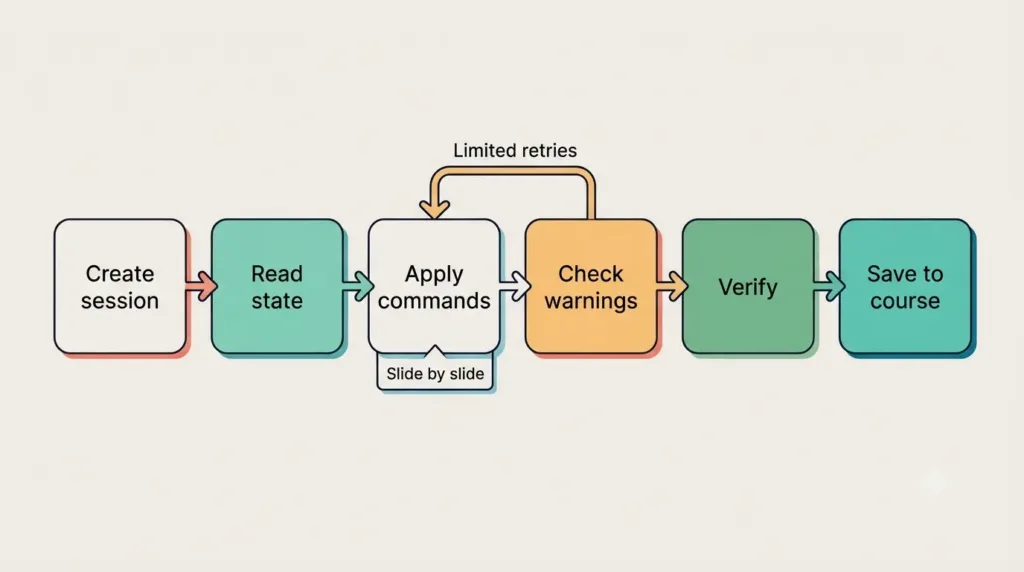
The warnings drive the feedback loop. An illustrative response looks like this:
{
“status”: “warnings”,
“warnings”: [
{ “code”: “low_contrast”, “detail”: “Text in item i-2 has a contrast ratio of 2.1:1 against its background. Use a darker text colour or a lighter background.” }
]
}
The checks cover layout, readability and styling problems. Two choices matter here. The warnings are not errors: the commands have already been applied, so the model fixes forward instead of rolling back. And the detail states the fix concretely, so the model does not need to re-derive it.
In a state-based or document-based model, the client sends the full result and the server accepts or rejects it, so the model gets no structured, incremental feedback about what is wrong. With commands, the server answers each call with the specific problems and the numbers needed to fix them.
2.6 The overlap problem: a case study in why the server must check
The overlap problem is the most persistent one in this kind of system, and it shapes the design.
The problem. When the LLM is asked to generate coordinates for every element on the slide, overlapping elements keep appearing, such as a title colliding with the text beneath it. Stronger models cope reasonably well, and smaller, faster models struggle.
More instructions do not fix it. Telling the model the canvas size and telling it not to overlap, even in a very long instruction set, still produces overlaps. Part of the reason is that “do not overlap” is one line inside a large body of text, and a model working through a long instruction tends to lose individual lines.
Grids do not fix it either. Replacing free coordinates with a grid, so the model chooses cells instead of pixels, only moves the confusion: the model still overlaps elements.
The fix. The canvas is fixed, so every element has to fit inside it, and that needs the real size of rendered text. The server measures text from known font metrics and builds a bounding box for every element. This avoids a round trip to the front end for every check and the weight of a headless browser, and unlike CSS flow it respects the strict canvas boundary. Before anything is pushed to the front end, an intermediate step checks whether elements overlap or fall outside the canvas. If they do, the check does not fix the slide silently. It sends the problem back to the model with the specific fix. The model corrects its own output, and the next result is checked again.
This applies beyond slides. When a rule can be computed, such as a geometric or arithmetic one, enforce it on the server and return the result to the model as feedback, because a prompt cannot guarantee it.
2.7 A quality floor for any client
Moving intelligence to the user’s AI client carries a risk. The output now depends on a model we do not control, and a weaker client could produce a weaker deck. The command layer raises the floor in five ways. Templates give the model proven slide patterns per theme as optional starting points it can adapt. Theme tokens keep colour and contrast consistent with the chosen theme. Server-side text measurement removes a class of sizing mistakes. Structured warnings with numerical fixes let a model repair its own mistakes within one or two retries, and a retry limit followed by a stop-and-report rule prevents runaway loops. Together these make the quality of a deck depend less on how capable the client model is and more on how well the platform guides it.
2.8 Variety without losing consistency
This much structure could bring back the sameness we started with, but the command vocabulary describes primitives and not layouts. The model has rectangles, circles, lines, text, images and charts, plus the ability to set opacity and colour, and it composes them.
Suppose a teacher asks for a bright, playful deck for school children, with a mascot, images wherever possible and a consistent mascot background. The model plans the whole deck from that brief. It keeps the mascot and its colours consistent across slides, and it chooses a different mood for the mascot on each slide, so there is variety inside a consistent identity. Which content comes next, a definition, an equation or an example, is driven by who the audience is and what they need, not by a fixed slot in a layout.
Themes work in a similar way. A theme has two parts: tokens for colour and contrast, and a design direction written as instructions, for example “bright colours, a mascot, rounded shapes”. The model can follow it. A user can also give their own direction in the prompt and keep it as reusable guidance in their AI client, for example as a skill.
2.9 Extending the vocabulary
A command vocabulary is easy to extend. Richer elements such as video or 3D content can be added by defining the element and the command that places it, and then describing it to the MCP layer so that AI clients know it exists. Because everything flows through the same command interface, a new element type inherits validation, undo and live streaming with little extra work.
2.10 Trade-offs
A command model has costs. Vocabulary design is real work, because too few commands make edits clumsy and too many confuse the model, so we kept the command vocabulary small and granular. Granularity also pushes complexity to the client, since the AI must plan and sequence commands, which is why the tool descriptions and templates matter so much. The third cost is tokens: the grammar has to be taught to the model, and that is a lot of text.
3. MCP specific thinking
3.1 A short primer on MCP
The Model Context Protocol (MCP) is an open protocol, introduced by Anthropic in late 2024, for connecting AI applications to external tools and data. It is often described as a USB-C port for AI: one standard connector instead of a custom cable for every device. Without a standard, every AI assistant needs its own integration with every product, so the work grows as assistants multiplied by products. With a standard, each side implements the protocol once, and the work grows as assistants plus products.
The three roles
- Host: the AI application the user talks to, such as a chat app, a coding assistant, or an IDE.
- Client: a connector inside the host that keeps a connection to exactly one server.
- Server: a program that exposes capabilities to the model. Ours is the 7Seers MCP server.
Messages and transport. MCP messages use JSON-RPC 2.0. Two transports are common. A local server usually talks over standard input and output. A remote server talks over HTTP. Ours is remote, which is why authentication becomes a first-class concern later in this post. Under the specification, authorization is optional and applies to HTTP-based transports, while local servers over standard input and output are expected to take credentials from their environment.
What a server can expose
| Primitive | What it is | Who decides to use it |
| Tools | Actions the model can call. Each has a name, a plain-language description and an input schema. | The model |
| Resources | Read-only context identified by a URI, such as documents, data or templates. | The application |
| Prompts | Reusable prompt templates a user can invoke. | The user |
Our portal relies mainly on tools, plus resources such as the slide templates.
The lifecycle of a connection. In earlier revisions, a connection began with a handshake in which client and server agreed on a protocol version and on the capabilities each supports. The current revision removes that handshake and makes each request self-contained, so any server instance can handle any request. Either way, the client discovers what the server offers, so the model sees tool names, descriptions and schemas. When the model decides a tool is useful, the client sends a call with arguments, the server runs it and the result goes back to the model.
At the wire level, a call to one of our tools looks like this (illustrative):
{
“jsonrpc”: “2.0”,
“id”: 7,
“method”: “tools/call”,
“params”: {
“name”: “apply_commands”,
“arguments”: {
“deck_session”: “abc123”,
“commands”: [
{ “command”: “remove_item”, “params”: { “slide”: 2, “item”: “i-1” } }
]
}
}
}
Why this matters beyond the plumbing
- Descriptions and schemas are read by the model. They are the product’s user interface, for a model instead of a person.
- The model chooses what to call and in what order. The server cannot assume a well-behaved sequence, so validation and guardrails belong on the server.
- Arguments are untrusted input. The user approves a connection, but each call is generated by a model and must be treated like any external request.
- Remote servers need real authorization. The flow is described in section 3.5, and the specification itself is at modelcontextprotocol.io.
3.2 How commands map to MCP tools
Sections 2 and 3 describe two different layers, and it helps to be explicit about how they connect.
- The command layer is our domain contract. It is a vocabulary of operations with validation and atomic application. It exists independently of MCP.
- MCP tools are the adapter that makes this contract reachable by an AI client. They handle discovery, authentication, session scoping and delivery of results.
Commands define what can be done to a presentation. MCP tools define how an AI client reaches that capability.
We did not create one MCP tool per command. A single command tool takes a session id and an array of commands. The model sees one tool with a rich schema instead of ten near-identical ones. That keeps the tool list small, lets related edits be batched in one call, puts validation and warnings in one place, and lets the command vocabulary grow without growing the tool surface.
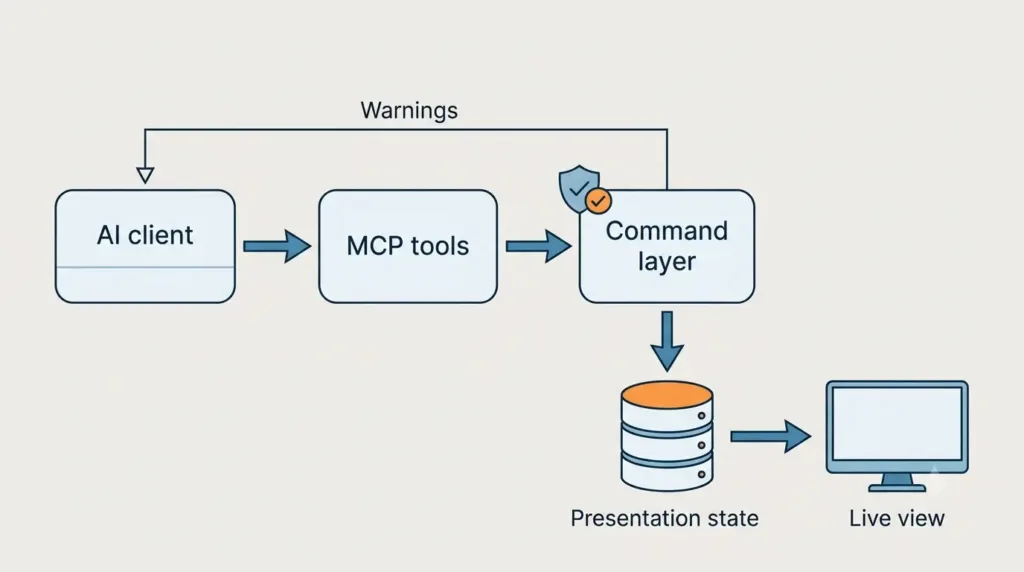
The MCP layer adds four things to every command. The caller’s token is checked on every tool call, so each command inherits the caller’s identity and permissions. The session id ties a batch of commands to one presentation. Warnings come back as the tool result, which is how the model learns what to fix. And the tool descriptions and the instructions file tell the model the order in which to use the tools.
The protocol can change without touching domain logic, and the domain logic can change without redefining the protocol. A second kind of client, such as an in-portal agent, can call the same command layer without going through MCP.
3.3 Designing the tool surface
Our tool surface grew as we learned what the model needed, and the tools fall into a few groups: authentication, sessions and editing, assets, and content management.
The most important design decision was to give the client a deterministic command tool. The backend also has higher-level tools that use an AI model on our side to interpret a natural-language instruction. The client AI is already reasoning about what the user wants, and it can do that better than a fixed backend prompt. A second AI interpreting the same intent adds latency and cost, and creates two places where the intent can drift. The command tool is the path where the reasoning stays in the client, where the user’s context already is, and the backend stays predictable.
A few smaller lessons followed. The tool description is the model’s manual, so ours includes rules and examples of what not to do. Building slide by slide is an instruction in the tool itself, which limits the blast radius and makes persistence and live streaming incremental. Structured feedback, with codes, element references and concrete fixes, lets the model recover without guessing. And the server enforces the order of operations, for example by refusing to start a new deck without a valid design choice.
Published guidance on MCP server design points the same way. Practitioner guides recommend designing tools around what an agent wants to achieve instead of exposing one tool per operation, and they commonly suggest keeping a server to somewhere between 5 and 15 tools, because every tool definition consumes context and makes selection harder (see Microsoft’s MCP security guide and Phil Schmid’s best practices).
Description quality has also been measured. A February 2026 preprint from UCLA and NTU, “From Docs to Descriptions”, examined 10,831 public MCP servers and found repeated tool names in about 73 percent of them, with thousands more showing wrong parameter meanings or missing descriptions of return values. In a controlled test where five functionally equivalent servers competed, the one whose descriptions followed the authors’ standard was selected 72 percent of the time, against a 20 percent baseline. The authors ran their experiments with a single model, gpt-4o-mini, and the work is a preprint, so the numbers indicate a direction more than a precise effect size. The direction matches what we saw: the model chooses and calls tools from their descriptions alone, so the description deserves the same care as the code.
3.4 Runtime behavior: how the model learns the system
The moment a client authenticates, an instructions file is loaded into the MCP session. The model reads it and gets an idea of two things: what the system is and how to use it. It describes what the application is, when to use it, what to build with it, which tools exist and a one-line summary of each. A resource list is exposed as well, including templates.
Tools alone describe operations, not intent. The instructions file is where we explain the workflow and the design philosophy. Each tool then carries a deeper layer of guidance in its own description: the parameters it needs, the response it returns and the prerequisites before calling it. Together, the instructions, the tool descriptions and the resources give the model what it needs to use the tools in the intended order.
3.5 Authentication: the hardest part
Authentication is the hardest part of exposing a product to AI clients. An AI client fits neither of the usual cases: it has no login page and cookies like a browser, and no secret in an environment variable like a server. It is an assistant acting on behalf of a person, so the design has to let the person approve access without ever handing their credentials to the assistant.
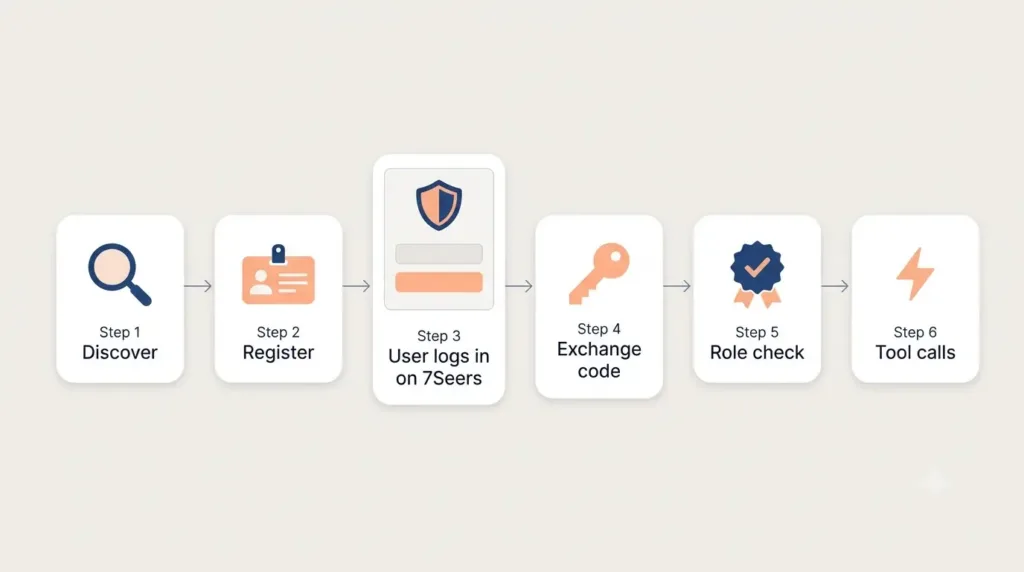
The design. MCP defines an authorization model for HTTP-based servers, built on OAuth 2.1, and the right design follows it, with the product’s existing identity layer doing the actual authentication. Done properly, the flow has seven steps:
- Discovery. The server publishes OAuth protected resource metadata (RFC 9728), which points to its authorization server, and the authorization server publishes its own metadata (RFC 8414) at a well-known location (RFC 8615). When a user adds the server, the client reads these documents to learn how authentication works.
- Client identification. Any AI client might connect, so clients cannot be registered by hand in advance. The preferred model is OAuth Client ID Metadata Documents: the client uses an HTTPS URL as its client_id, and the authorization server fetches the client’s metadata from that URL. Dynamic client registration can stay available for older clients.
- Authorization request. The client sends its client_id, a redirect_uri, a code_challenge (PKCE) and the resource parameter (RFC 8707) to the authorization endpoint. The server verifies the redirect_uri and sends the user to the product’s own login page.
- Login and consent. The user signs in on the product’s own login page, or continues if already signed in, and approves the access the client is asking for.
- Code issuance. The server issues a short-lived authorization code bound to the client that started the flow, and includes the iss parameter (RFC 9207) in the response so the client can validate who issued it. For a local client the redirect lands on a localhost callback, and for a web client on its own callback address.
- Token exchange. The client exchanges the code, together with its code_verifier and the same resource parameter, for an access token. The server issues the token only for the intended audience and role.
- Every tool call. The client sends the access token with each tool call, and the server checks the token, its audience and the caller’s role every time.
This design holds up for five reasons. No password reaches the AI client, because the user logs in on the product’s own page. Clients do not need to be known in advance, because they identify themselves with a metadata URL. PKCE binds the flow to the client that started it, so an intercepted code is useless to anyone else. Audience and role checks happen at the boundary: only the intended role gets a token for this application, and the check is made when the token is issued and not only when a tool is called. And there is no parallel authentication stack, since the OAuth layer sits on top of the tokens the existing identity system already issues.
3.6 Guardrails and security
Giving AI the ability to operate a product raises an obvious question: what should it not be able to do? Colleges will ask the same thing, so we organise the answer around four questions.
- Who is the caller? The user logs in on our own page, so no password passes through the AI client. The authorization code is bound to the client that started the flow through PKCE, the redirect is verified, and the code is consumed when exchanged. The access token is checked on every tool call, and only the intended role is accepted.
- What can the caller do? Only what the tools expose. The server validates every command, and saving content does not make it visible to students. Publishing is intentionally not available through MCP and stays with the teacher in the product.
- Is a human in the loop? By default, yes. The live URL lets the teacher watch every element appear as it is created, and the final publish step stays with the teacher.
- How do we treat what the model sends? Arguments arriving from a model are untrusted input, so they are validated like any external request, which is exactly what the command layer does.
Observability and deeper guardrails, such as how we log tool calls and measure quality per client model, deserve their own post.
Designing the command layer, the OAuth flow and the validation rules together was a product engineering exercise at 47Billion, because each one constrains the other two: the commands decide what a token must be allowed to do, and the validation rules decide what a model can safely be allowed to try.
3.7 Lessons from real clients
Clients differ, and two lessons came out of that.
Server instructions are not applied equally everywhere. Some clients follow the instructions an MCP server provides reliably, and others do not. Since the instructions carry a lot of the design guidance, a client that ignores them produces noticeably weaker presentations. The fix is to compile the instructions into a skill file that a user can add in their client alongside the MCP server. The practical lesson: do not depend on a single channel to teach the grammar. Use the server instructions, the tool descriptions, the resources and, where the client supports it, a skill file. This is also why the in-portal agent matters: it can carry the instructions itself, so a teacher does not have to install anything.
Skills and themes are close relatives. A skill is reusable guidance for a kind of work, so it behaves much like a template. A college that wants its presentations to follow a house style can package that style as a skill, and a UI could be built on top of it to manage skills for an institution. Our themes already work this way in spirit: design direction, saved as instructions, applied by the model.
4. Where the moat is
MCP is an open protocol and anyone can build an MCP server, so the interface cannot be the moat. The table traces where defensibility comes from.
| Step | What the problem taught us | What we built | What it gives us |
| 1. Problem | Taste is personal, and intelligence is becoming a commodity. | A capability that an external AI client, or our own in-portal agent, can operate | A reason for users to bring their own AI, and a path for those who do not |
| 2. Command based | If a model we do not control operates our component, it must not be able to break it. | Typed, atomic, validated commands with templates, tokens and warnings | A quality floor and trusted execution |
| 3. MCP | That capability must be reachable by any AI client, safely. | An MCP server with standards-based OAuth and role checks | Distribution and trust |
What is defensible
- Trusted execution. Role-based access, identity tied to our existing identity system, server-side validation and a human-controlled publish step. For a college, “what did the AI do on our platform” has an answer.
- Domain grammar baked into the tools. Templates, theme tokens, the instructions file and validation rules encode what a good lecture deck looks like. Any client model gets better output because of them.
- System of record. Decks live in courses and modules inside 7Seers. The more content accumulates there, the more valuable the platform becomes to a college, because its material, structure and history are in one place.
- Distribution. Our existing relationships with colleges. This is not a technical moat, and it is the hardest one to copy.
What is not a moat: the protocol itself, because it is open; the command vocabulary on its own, because it can be copied; and a clever prompt, because it can be replaced by a better model.
Openness is part of the strategy: every additional AI client that can connect increases the number of decks created, stored and managed inside our system of record.
5. What an AI client can do today
A teacher connects their AI client to 7Seers and approves access in the browser. They ask for a deck on a topic. The client lists the available themes, and the teacher chooses one. The client creates a session and shares the live link. The teacher watches slides stream in. If something overlaps or fails a contrast check, the client sees the warning and fixes it. When the teacher is happy, the client saves the deck into a course, optionally inside a module. The teacher then publishes it through the panel.
The takeaway. When a model is the primary user of your product, stop asking it to produce a finished artifact and give it three things instead: a small, typed vocabulary of commands, a standard way to reach them, and a server that checks its work. Taste stays with the user and their AI client, while correctness, access and trust stay with the product.
Building something similar
We designed the command layer, the MCP server and the authentication flow described here for 7Seers, covering both the product decisions and the engineering. If you are planning to make your own product operable from Claude or another AI client, or to add an agent inside it, 47Billion’s AI/ML and product development teams can help you scope and build it, and our agentic AI services cover the agent side. A useful first conversation starts with which operations of your product an AI should be allowed to perform, how those operations get validated and how users sign in.
You can book a discovery call at 47billion.com/contact-us or write to hello@47billion.com.