When we started breaking the frontend of 7Seers into independent deployable pieces, we thought the hard part was the architecture decision. It was not. The architecture decision took a week. The consequences of that decision have been with us ever since.
This is not a post about whether you should adopt micro frontends. That question has a context-dependent answer and anyone who gives you an absolute one is probably selling something. This is a post about what actually happens after you commit the failure modes, the production incidents, and the tradeoffs that do not show up in architecture diagrams.
For organizations building complex digital platforms, choosing the right software architecture strategy plays a critical role in scalability, maintainability, and faster product delivery.
Where We Started
7Seers is a multi-portal platform for colleges in India. Building scalable platforms like this requires strong custom software development practices that support evolving business requirements.
Students use it to prepare for placements. TPO officers use it to manage the placement process. Admins run the institution. An AI document tool, a presentation composer, a career path planner, and a super admin layer sit alongside all of this. Seven distinct surfaces, one engineering team, one codebase.
When the team was small, one codebase was the right call. One repo, a simple pipeline, no coordination overhead. The trouble began when two things grew together: the team and the product. Multiple developers working across Course, Presentation, Quiz, Tools, Account, TPO, Admin, Super Admin, and Career Path simultaneously and the monolith started failing in three specific ways.
The Three Problems That Would Not Go Away
Problem 1: Everyone was fighting over the same files. Our routing files, layout components, and shared utilities were touched by every developer on every feature. Every pull request caused a conflict. We spent hours every week resolving merges that had nothing to do with the actual feature being built. Velocity dropped not because the code was bad, but because coordination overhead had quietly become a full-time job.
Here is what this looked like in practice. Two features were in flight simultaneously a new AI mock interview feature in the Student portal, and a bulk-upload flow in the TPO portal. Both required touching AppRouter.tsx to register their new routes, both required touching the shared Sidebar.tsx to add their nav entry, and both required a change to the shared usePermissions hook. Three files. Two features. One merge conflict that took an afternoon to resolve not because the features conflicted logically, but because the monolith gave them no choice but to share the same files. The AI feature was ready. The bulk-upload had a bug. Both waited. Modern engineering teams increasingly adopt scalable architectures and AI-powered software development approaches to improve delivery speed and reduce dependency bottlenecks.
Reusable components made this worse, not better. When the DataTable component used across the Student dashboard, TPO reports, and Admin analytics needed a new sort prop, every developer who touched any of those surfaces had a stake in the change. A seemingly simple component update became a three-team coordination exercise. The more we invested in reusable components, the more entangled the codebase became. Good engineering practice, perversely, amplified our coordination problem.
Problem 2: Nothing could ship alone. Everything compiled into one build. If one feature was ready and another was not, both had to wait. A bug fix in the Admin panel meant a full rebuild and redeploy of the entire product including the Student portal that had absolutely nothing to do with it. Every release was all-or-nothing.
Problem 3: Modules were impossible to hand off. We could not extract a module cleanly because everything was entangled. Shared imports, shared routing, shared everything. Untangling any one piece meant touching half the codebase. This mattered more than it might seem we knew that as 7Seers grew, we would need to offer specific portals to specific clients. A TPO customer does not need the Student AI features. A publisher does not need the Admin panel. With a monolith, giving a client their portion of the product was not a packaging decision it was a refactoring project.
These were not small annoyances. They were a structural limit.
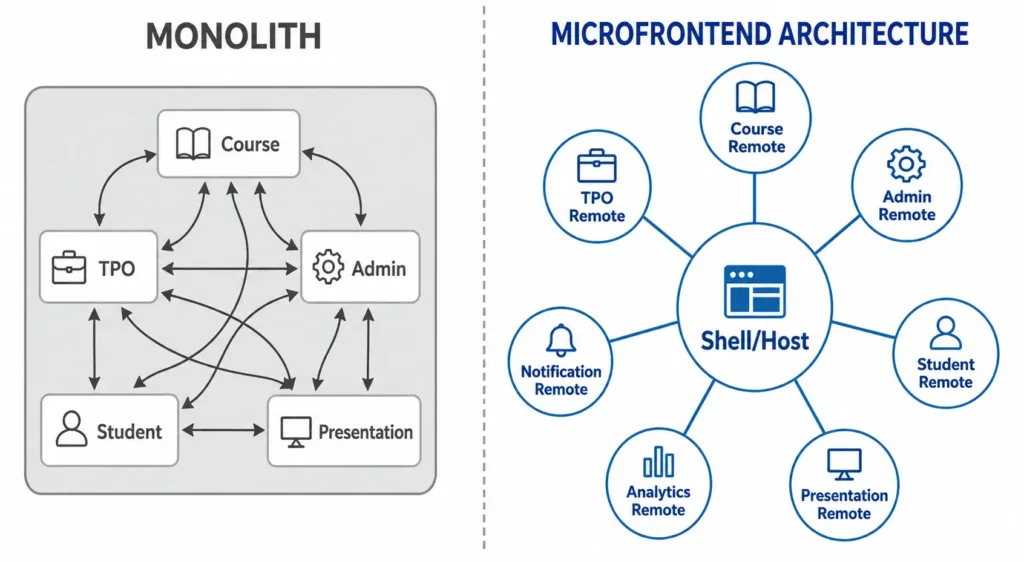
Figure 1: Monolith (tightly coupled modules) vs. Micro Frontend Architecture (Shell/Host with independent remotes)
Why Better Git Practices Could Not Save Us?
Before committing to micro frontends, we genuinely tried the alternatives: stricter branching rules, code ownership on shared files, protected directories with mandatory reviewers. None of it addressed what was actually broken, for reasons that become clear when you examine each approach.
Feature branches solve merge timing, not build coupling. You can have the cleanest GitFlow or trunk-based development strategy in the world. The moment code merges, it enters one build pipeline with everything else. A broken import in the Presentation module fails the Admin module’s CI run. Git controls when code merges it has no bearing on what happens after.
Code owners trade merge conflicts for review bottlenecks. Mandatory reviewers for shared routing and utility files meant the Presentation team could not ship without someone from the platform team approving their routing changes. The conflict was gone. The delay was not. The bottleneck just moved from Git to the review queue.
Monorepo tooling narrows the gap but does not close it. Tools like Nx can give you selective CI only rebuild what changed. This is genuinely useful. But you still have one deployable artifact. ‘Deploy only the Presentation feature today’ is not a sentence you can say in a monorepo, regardless of how sophisticated the task runner is. The deployment boundary is the application, not the module.
A modular monolith is still one build. Even with strict domain folders, zero cross-imports enforced by lint rules, and perfect separation on paper one package.json, one Webpack config, one artifact. Every deploy is every feature. A hotfix to the Admin portal redeploys the Student AI features that had nothing to do with it.
The problems we were hitting were structural. The build was coupled. The deployment was coupled. No branching convention changes that. We stopped trying to discipline our way out of a monolith and started designing our way out.
Worth noting: Meta (Facebook) still runs one of the largest monorepos in existence. When their codebase outgrew what Git could handle, Git’s maintainers were unwilling to make the changes needed so Meta switched to Mercurial and built extensive custom tooling on top. That work eventually became Sapling, their own source control system, open-sourced in 2022. At that scale, monorepo is still the right choice, but it required a decade of dedicated investment in tooling that most teams cannot afford to build.
Why We Did Not Use Git Submodules Either?
Before landing on Module Federation, there was one more Git-based approach we considered seriously: using Git submodules to manage the shared layer. The idea was simple put the shared design system, utility functions, and types into their own repository, then include it as a submodule in each portal repository. Every portal would pin to a specific commit of the shared layer. Everything resolves at compile time, no runtime surprises, TypeScript enforces contracts across the whole build.
The appeal is real. No runtime version negotiation. No shared scope conflicts in the browser. A junior developer can understand the model: it is just a Git repo inside another Git repo. We got as far as prototyping this before the tradeoffs became clear.
The fundamental problem: every time the shared design system updates, every portal repository needs to explicitly bump its submodule reference and trigger a full rebuild. For seven portals, that is seven pull requests, seven CI runs, and seven deployments every time someone updates a shared button component. git pull on a parent repo does not update submodules. It is a separate command that new developers reliably forget, which means repositories quietly fall behind without anyone noticing until something breaks.
There is also a deeper issue. Git submodules are a compile-time solution. They lock the shared layer to a specific commit. If you want all portals to reflect a shared design system update simultaneously, you have to coordinate seven separate deployments. What Module Federation makes automatic remotes picking up a shared library update on the next load submodules make deliberate and sequential. For an actively evolving shared layer, that coordination overhead compounds quickly.
Submodules are a legitimate choice when the shared layer is stable and rarely updated, and when you want the safety of compile-time enforcement over the flexibility of runtime resolution. That was not our situation. Our design system was still evolving, and we needed the shared layer to stay live across all portals without coordinated redeploys on every component change. That requirement pointed clearly to Module Federation.
Why Not Just Build a Shared npm Package?
This is the second question everyone asks. If reusable components are the problem, why not extract them into a private npm package a proper component library and publish it? Every remote installs it. One source of truth. Clean versioning. Problem solved.
A shared npm package solves the duplication problem. It does not solve the deployment problem. When your DataTable component gets a new prop, you publish @7seers/ui@1.2.0. Now every remote needs to bump its dependency, rebuild, and redeploy. Seven remotes. Seven PRs. Seven CI runs. Seven deployments coordinated, sequential, because you want all surfaces to look consistent after the update. You have not gained independence. You have just moved the coordination from merge conflicts to version bump cycles.
There is also a subtler failure mode: the host becomes a bottleneck. If the Presentation remote is published as an npm package and the shell installs it as a dependency, the shell must bump the version, rebuild, and redeploy every time the Presentation team ships. In a team with multiple remotes shipping frequently, the shell ends up redeploying five times a day just to pick up others’ changes. The package approach turns the shell into a release coordinator which is exactly the role we were trying to eliminate.
A shared npm package is the right solution for stable, design-system-level components: buttons, inputs, typography, tokens. Things that change rarely and where explicit opt-in to a new version is desirable. It is not the right solution for independently deployable product surfaces. Module Federation was created precisely because npm packages lose independent deployment. The distinction matters.
We also apply this distinction within the same product. The Presentation composer is a remote it ships independently, embedded across four portals. The 3D model viewer, on the other hand, is a package. It is a contained utility that does not need its own deployment pipeline. Not everything needs to be a remote. The question is whether the surface needs to ship independently and whether it causes coordination problems when it does not.
We do maintain a shared component library for our design system primitives. What we do not do is publish the Presentation tool or the TPO dashboard as npm packages. Those are remotes. The design system is a package. They are solving different problems.
How Module Federation Actually Works
Before getting into the mechanics, it helps to separate three things most teams conflate. Runtime architecture (monolith vs micro frontend) is about deployment boundaries. Repository topology (monorepo vs polyrepo) is about where source code lives these two decisions are independent of each other. And deployment topology is the axis that actually matters: whether your deployables go out independently or in lockstep. We were confusing all three when we started. The only thing that moved the deployment axis was giving each surface its own build output and its own pipeline which is what Module Federation gave us.
The pattern we landed on is Module Federation, specifically via Webpack 5. One shell application acts as the host. The shell handles authentication, layout, sidebar, and top-level routing. Each remote owns its own build, its own deploy, and its own release schedule.
One rule we enforced early: the shell should be thin and stable. It deploys rarely. Remotes deploy frequently. If the shell carries product logic feature flags, domain-specific components, business rules every shell deploy becomes a high-risk event that touches everything. The shell’s job is infrastructure: routing, auth context, the shared scope, the error boundaries. When the shell changes, every remote is affected. When a remote changes, nothing else is. That asymmetry only works if the shell is kept deliberately small.
The mechanism is remoteEntry.js. Every remote exposes this file a manifest that registers what modules that remote makes available. Importantly, remoteEntry.js is not fetched upfront for all remotes when the shell loads. It is fetched on demand: when the user navigates to a route that needs a particular remote, Webpack fetches that remote’s entry file, initialises it into the shared scope, and loads the component chunk. This lazy-by-default behaviour keeps the initial shell load fast.
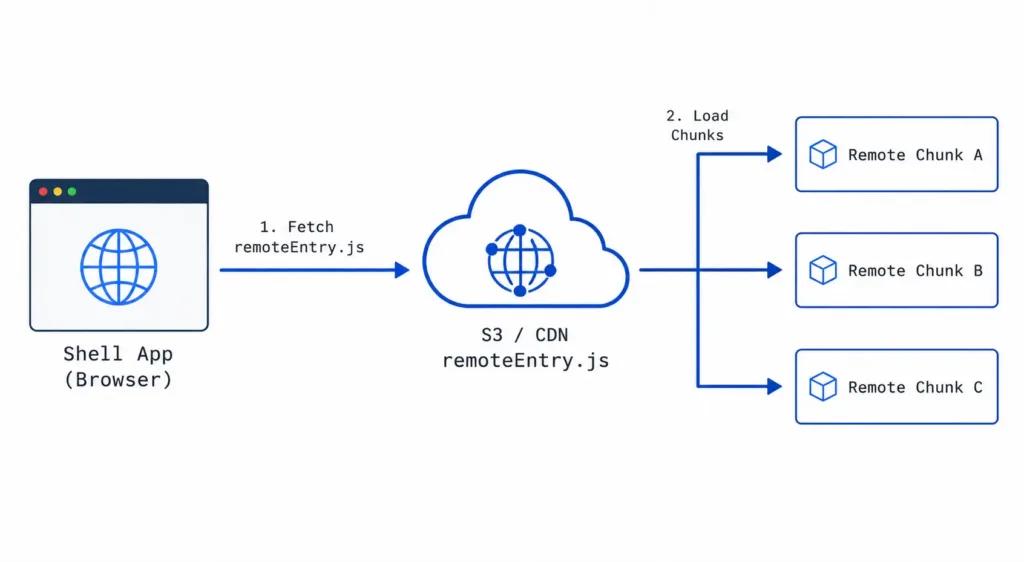
Figure 2: remoteEntry.js runtime loading flow — Shell fetches manifest on demand, then loads the required remote chunks from CDN
The shared scope is where React, shared utilities, and any federated library live at runtime. Every remote and the shell negotiate over this scope automatically which is exactly why version mismatches are so hard to debug when they go wrong.
What We Run in Production
Not every domain needed to become a federated remote. We migrated gradually building the host first, extracting the highest-conflict domains one by one, leaving stable modules untouched until they actually needed to move. The product kept running throughout.
Similar architecture decisions are required when organizations build industry-specific platforms across healthcare software development, financial software solutions, and education technology solutions.
| Domain | Route | Deployment Type |
| Course / Quiz / TPO | /course, /quiz, /tpo | Local lazy-loaded |
| Presentation (legacy / new) | /presentation, /presentation/new | Remote – ships independently |
| Tools – AI doc chat | /tools/document | Remote – ships independently |
| Account | /account | Remote – ships independently |
| Admin / Super Admin | /admin, /superadmin | Remote – ships independently |
| Career Path | /abctest | Remote – ships independently |
The Presentation remote is a good example of why federation made sense at the surface level. The same remote is embedded across the Student portal, the TPO portal, the Publisher portal, and the Super Admin observability view. Before federation, reusing it meant either duplicating code or sharing it through the monolith. As a remote, it ships once and is consumed wherever needed, with no coupling to the consuming portal’s release cycle.
Shared State Is the First Thing That Breaks Your Mental Model
The instinct when splitting a frontend is to think about UI components. That is the wrong first question. The right first question is: what state needs to cross boundaries, and who owns it?
In a monolith, this is invisible. The auth token lives in a store and every component reads it. In a federated architecture with seven remotes and a shell, the options are: each remote manages its own auth state (you now have seven separate login flows), or the shell owns it. We made the shell the authority for auth, session, and user context. Remotes receive this as props or via a React Context published by the shell. They consume it. They do not manage it.
This works, but the shell’s contract with remotes is now load-bearing. Every time the user object changes shape – a new field, a changed permission structure every remote needs to handle that gracefully. We learned this when we added role-based access control mid-build. The user object grew four new fields. Two remotes broke silently on the new permission checks no loud error, just missing UI elements. A user flagged it. We traced it in about forty minutes via error tracking to a Cannot read properties of undefined originating from the permission check utility. The fix was a one-line nullcheck. The forty minutes were in the finding, not the fixing.
Circular Dependencies: The Problem That Should Not Exist But Does
In a monolith, circular dependencies are a linting problem. In a federated micro frontend architecture, they become a structural problem no linter catches at the right time.
The scenario: the shell exposes a shared utility. Remote A consumes it. Remote B also consumes it. Fine. Now someone decides Remote A should expose a notification component the shell should use. The shell now depends on Remote A. Remote A depends on the shell. You have a circular dependency across two separately deployed applications. Without intervention, what you get is a runtime hang – the shell waiting on Remote A to initialise, Remote A waiting on the shell’s shared scope, neither completing. In development it looks like the app simply not loading. In production, with CDN caching old manifests, it looks like a partial render followed by a freeze on specific routes.
The resolution that works in practice: create a third micro frontend specifically for shared components — a utility layer that is neither the shell nor any product remote. The host and other remotes consume from it. Nobody writes to it except the team that owns it. This gives shared logic a neutral home and breaks the dependency cycle. The correct constraint: the shell is a pure host. It exposes infrastructure and never consumes logic from remotes. We enforce this as a code review rule, not a Webpack configuration, because no build tool prevents this structure automatically.
Version Mismatches Are a Category of Bug You Did Not Have Before
Module Federation lets you share libraries across remotes to avoid loading React multiple times. It is also one of the most reliable sources of production surprises.
In singleton: true mode, only one instance of a shared library runs – whichever version loads first wins. If the version ranges between the shell and a remote are incompatible, the remote refuses to load entirely. You will see an error in the browser console along the lines of “Unsatisfied version 18.3.0, required ^18.2.0” pointing to the shared scope conflict. To debug this, check window.__webpack_share_scopes__.default in the browser console – it shows every shared module, which version loaded, and which remote provided it.
We hit this with a shared UI component library. The shell was on one minor version. A remote had bumped to the next. In singleton mode, the remote fell back to the shell’s version silently. The component had a behavior change between those two versions. The remote was coded against the new behavior. It rendered incorrectly on production for two days before we traced it back through the shared scope.
The harder truth: version discipline ultimately requires a human in the loop. If one developer updates a shared library and does not inform the team, every remote using that library is now on an inconsistent version – and the errors that surface are generic enough that nobody will immediately connect them to the version change. You need a shared dependency registry – a document or automated check that tracks which libraries are shared, what version each remote is on, and who owns the decision to upgrade.
CSS Is Not Isolated by Default in Micro Frontend Architecture
Each remote brings its own stylesheet and nothing stops those stylesheets from conflicting at runtime. If two remotes define a class with the same name but different properties, whichever stylesheet loads last wins.
We ran into this with the Presentation composer using reveal.js, and a PDF viewer in another remote both defining global CSS. At compile time, both looked fine. At runtime, the two sets of global styles collided in ways that neither library anticipated. We use CSS Modules for component-level styles and scoped parent ID prefixes for any global or utility class narrowing the blast radius of any style that escapes the component boundary. We now audit third-party library stylesheet injection before adding any new dependency to a remote. It is a line item in our PR checklist.
This is partly inherited from how the product evolved. Revamping one portal without simultaneously revamping others creates visual debt that federation makes harder to fix the CSS now lives in separate builds with separate owners, rather than in one place where a single change propagates everywhere.
The Build Pipeline Compounds With Every Remote You Add
A monolith has one build. One artifact. One deploy. One cache to invalidate. Seven remotes means seven builds, seven artifacts, seven deploys, and seven CDN cache invalidations each of which can fail independently.
If a remote deploys a new build but CloudFront serves the old remoteEntry.js, the shell loads the previous version. The new code is on S3. The browser never sees it. We have had incidents where five of seven remotes were on the latest build and two were not the user sees a state machine nobody designed. Components from different product versions, in the same browser session, with shared state they each understood differently. These incidents showed up in error tracking as type errors. Tracing back to a partial deployment took longer than fixing the bug itself.
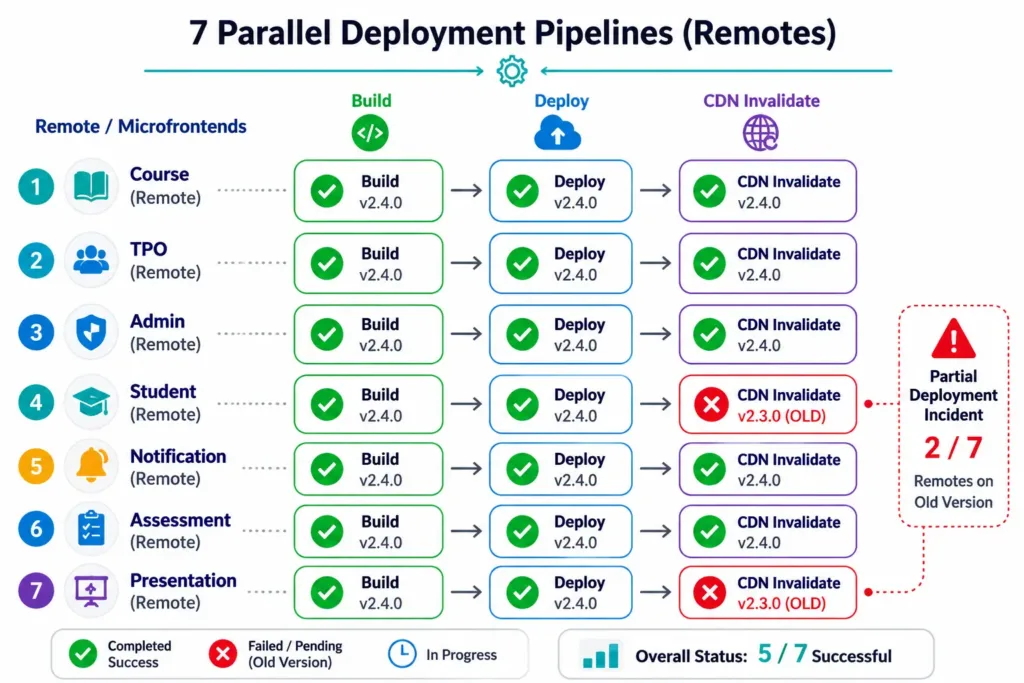
Figure 3: 7 parallel deployment pipelines — a partial deployment incident where 2 of 7 remotes remained on the old version due to CDN cache not invalidating
One approach that helps: chunk hashing. Making sure chunk names include a content hash means the browser treats any changed chunk as a new file the difference between cache invalidation that works reliably and cache invalidation that works most of the time. CloudFront invalidation is now a mandatory gating step in every deploy job. And a partial deployment is a production incident not a transient state that self-resolves.
Alternatives to Module Federation We Evaluated
Iframes are the oldest micro frontend pattern and the most isolated — each remote runs in its own browsing context with zero style leakage or version conflicts. The cost: cross-frame communication via postMessage only, shared state requires explicit serialization, and deep linking is painful. Spotify’s desktop application uses iframes with an event bus for inter-component communication. Their web player later moved to React and Redux, a different approach suited to the browser’s performance constraints. Iframes work well for untrusted third-party content; they add unnecessary complexity for products where shell and remotes need shared auth and navigation.
Single-SPA is a framework-agnostic orchestration library predating Module Federation. Each app exports a bootstrap, mount, and unmount lifecycle. Single-SPA does not solve the shared dependency problem natively — you end up loading React multiple times unless you layer import maps on top. Its strength is polyglot environments where remotes use different frameworks. If your team is standardized on one framework, Module Federation is simpler.
Git submodules for the shared layer resolve everything at compile time — no runtime negotiation, no version surprises in production. We evaluated this path directly and describe the full reasoning in the section above. The short version: submodules work well when the shared layer is stable and rarely updated; they become a serious coordination bottleneck when it is actively evolving, which ours was.
We chose Module Federation because we needed the shared design system live across all portals without coordinated redeploys, we are a React-only team so framework diversity was not a factor, and we needed auth state shared cleanly across surfaces — which iframes make unnecessarily hard.
Developer Experience Takes a Deliberate Hit
In a monolith, a developer runs one command. With Module Federation, a developer working on the Presentation remote needs the shell running to test it in context. Local development now has infrastructure dependencies. We maintain a standalone mode where remotes run with mocked shell context sufficient for component-level work. Integration testing, where you need everything running together, happens on a shared staging environment.
TypeScript contracts across build boundaries are a subtler problem. A type change in the shell’s shared context does not break the remote’s build it breaks at runtime, when the remote receives a shape it was not expecting. We manage this with a shared types package published to our private npm registry, pinned in each remote’s package.json. It adds overhead. But it surfaces type errors in CI before they reach production.
One observation worth sharing: micro frontend architecture and AI coding tools interact in an interesting way. Learn how engineering teams are using AI as an engineering partner to accelerate software development workflows.
Smaller, scoped repositories mean smaller context windows per task a prompt about the Presentation remote does not drag in the entire codebase. In our experience, the more precise and file-specific the prompt, the better the output. ‘Change this component in these files’ works better than ‘refactor the way we handle state across portals.’ Micro frontends force that precision by making the scope boundary explicit which turns out to be good prompting discipline regardless of the tooling.
Performance Implications of Micro Frontend Architecture
Federation adds a runtime loading chain that a monolith does not have: shell loads, discovers remotes, fetches remoteEntry.js, fetches chunks, renders. Each hop adds latency and introduces a failure point. On a cold load, the additional round trip for remoteEntry.js adds 80-120ms on our setup negligible on fast connections, noticeable on slow mobile networks. We mitigate this with route-level prefetching: when a user is likely to navigate to a particular remote, we prefetch the remote entry and critical chunks ahead of the navigation event.
CDN placement of shared dependencies also helps significantly. If common libraries like React are served from a CDN rather than bundled inside each remote, the browser caches them once across all remotes. A user who loaded the Student portal has already cached React. When they navigate to the TPO portal, that remote’s React chunk is a cache hit. The performance benefit compounds across sessions.
We enforce per-remote bundle size limits in CI. Each remote has a budget. Exceeding it fails the build. Before federation, the entire frontend was one bundle with one budget that grew unchecked. Breaking it into remotes made the cost of each surface visible and accountable.
If SEO is a concern for your micro frontend setup, server-side rendering (SSR) can be combined with Module Federation to ensure full HTML is available before JavaScript executes improving First Contentful Paint (FCP), Largest Contentful Paint (LCP), and search engine indexability. Frameworks like Next.js are increasingly used alongside federation patterns for exactly this reason.
Observability Across Remotes
A federated architecture is harder to observe than a monolith because errors originate in different builds, different deployments, and different source maps. We use a unified error tracking setup across all remotes and the shell each remote sends errors to the same Sentry project with a remote_name tag. When an error fires, we know immediately which remote caused it and which version was deployed. Without this tagging, a production error in the Presentation remote looks identical to one in the Admin remote.
Every deploy is also tagged with the remote name and build hash. When a production incident occurs, we can immediately answer: which remotes deployed in the last hour? That question alone resolves most partial-deployment incidents faster than any amount of log analysis.
Rollback Strategy When Things Go Wrong
In a monolith, rollback is straightforward deploy the previous artifact. In a federated architecture, rollback is per-remote, which is both the advantage and the complication. If the Presentation remote ships a bad build, we redeploy the previous Presentation build. The shell and all other remotes are unaffected. We retain the last three builds per remote on S3. A rollback is a one-command Jenkins trigger that redeploys the previous artifact and invalidates the CDN.
The harder scenario is a shell rollback. If the shell ships a contract change that breaks a remote, rolling back the shell means all remotes revert to the previous shell context simultaneously. We have done this once. It worked because the previous artifact was retained and the rollback procedure was scripted and tested. We test rollback in staging quarterly deliberately deploying a bad shell build and executing the procedure to confirm it still works. A rollback strategy you have never tested is not a rollback strategy.
Companies Using Micro Frontend Architecture in Production
The pattern is not academic. Spotify uses micro frontends for its desktop application the player, navigation, and artist pages developed and deployed by independent teams, isolated using iframes with an event bus for communication. Their web player later moved to React and Redux. IKEA implemented micro frontends so the checkout team can update payment integrations independently from the product display team. Zalando built Project Mosaic, their own micro frontend framework combining server-side and client-side composition. DAZN rebuilt its web application using micro frontends with a lightweight bootstrap that loads one micro frontend at a time based on routing. Upwork adopted the pattern to incrementally modernize their frontend without a full rewrite, running legacy and new stacks side by side.
The common thread: large product surfaces, multiple teams, and different parts of the product that need to move at different speeds. That combination is where micro frontends earn their complexity cost.
What We Would Do Differently?
First: finalize the shared design system before splitting. We introduced Module Federation while the component library was still evolving. Every remote was built against a slightly different understanding of what a component looked like different prop interfaces, different default behaviors. We spent weeks de-duplicating behavior that should have been standardized before federation. The practical rule: freeze your shared layer, agree on component contracts, and only then start extracting remotes.
Second: document the judgment calls, not just the mechanics. We have runbooks on how to configure a remote and run the pipeline. What we mostly lack is documentation on the decisions when something belongs in the shell versus a remote, when a shared library version bump needs cross-team coordination versus is safe to do alone. That knowledge still lives mostly in the engineers who built the system. We now write an Architecture Decision Record for every non-obvious federation boundary decision.
Third: run a dependency audit before you federate. We discovered version mismatches in our shared libraries after the fact when they caused production incidents. A simple audit of package.json across all planned remotes before you begin federation would surface these conflicts upfront. Agree on shared library versions, lock them, and make version bumps a coordinated event from day one.
When Micro Frontend Architecture Makes Sense And When to Start
Micro frontends are not a complexity reducer. They are a complexity redistributor. The complexity of a coupled monolith becomes the complexity of coordinating independent systems. Where that coordination lands and whether it is cheaper depends entirely on your situation.
They make sense when different parts of your product genuinely have different release velocities, different team ownership, or different risk profiles when a change in one area should have zero bearing on another area’s ability to ship, and when you need to offer specific parts of your product to specific clients without exposing the entire codebase.
For 7Seers, the tradeoff has been worth it. The Presentation remote ships independently. A Career Path update does not block an Account release. An Admin bug fix deploys in minutes not after waiting for the next full-product release window. But we would not make the same decision for a product with two surfaces, a team of three, and a monolith that is working fine.
On timing: if you have clarity early about which parts of your product are truly distinct, and a team large enough that multiple people will be working on those parts simultaneously, starting federated from the beginning is defensible. If you do not have that clarity the common case for a product still finding product-market fit starting with a modular monorepo is the better call. If you do this well, the eventual migration to federation is a structural change, not a refactoring project.
The short version: start modular, not federated. Migrate to federation when the coordination cost of the monolith becomes visible and specific — not when you anticipate it might become a problem someday. The architecture should serve the organizational reality, not the other way around.
Need help designing scalable software architecture for your next-generation application?
Our engineering teams help businesses build, modernize, and scale complex digital platforms using modern development approaches.
Talk to Our Engineering Experts